Category: Reviews

  • GoDaddy Website Builder Review

    GoDaddy Website Builder Review

    GoDaddy offers intuitive online store building solutions that you can set up in minutes. Its section-based editor lacks true drag-and-drop functionality, and design flexibility is somewhat limited. But it is easy to use, has a neat control panel, boasts various marketing, e-commerce and AI tools. These are all integrated into the builder, so you don’t have to do any extra work to make your site look consistent. Overall, it’s a good option for beginners who want to get their store online quickly and don’t want to spend a ton of time making it look good.

    GoDaddy Pros & Cons

    PROS

    Very easy to use
    Excellent support
    Competitive price

    CONS

    The editor is a bit limited.
    Can’t add custom code

    Overview

    The GoDaddy Website Builder at a Glance

    For over 15 years, GoDaddy has proudly held the title of the world’s largest domain registrar, providing exceptional web hosting and website building solutions. Designed from the ground up to offer a fast and hassle-free website creation process, now including the help of new AI tools, GoDaddy’s website builder is focused on empowering small businesses in the e-commerce space. .

    What sets GoDaddy apart is its intuitive editor that is aimed at users of all levels. Whether you’re a beginner or an expert, GoDaddy offers the ability to effortlessly create your own website and access a suite of marketing tools perfectly tailored to the needs of your online store. GoDaddy is here to help you get started if you don’t know where to start.

    GoDaddy goes beyond creating a website by providing self-help resources and educational materials that cover various aspects to start your eCommerce journey. From beginner’s guides to pro tips for launching your new website, GoDaddy has you covered.

    If you’re a small business owner with limited experience, GoDaddy’s Marketing + Websites package is an ideal option. Experience the benefits of GoDaddy and build your own website with confidence.

    Using GoDaddy

    Getting started with GoDaddy is a very simple process. You can sign up for a seven-day free trial without providing your credit card details or other payment information. It’s also possible to continue with the limited free plan forever after the trial period ends and not lose your job, which is nice.

    Additionally, GoDaddy’s user interface is intuitive and easy to navigate. The main dashboard lets you control everything from your website builder subscription to your domains and any other GoDaddy products you have.

    The editor is also clean and easy to use, and we didn’t experience any usability issues during testing.

    GoDaddy Features and Tools

    GoDaddy’s website builder may lack some flexibility, but that doesn’t mean it doesn’t have a great selection of great features.

    GoDaddy Appointments

    GoDaddy has great online dating tools that you can add to your site. They allow you to add a calendar to your website so clients can book online and sync it with multiple Google and Apple calendars so employees can keep track of their schedules. You can also set it up to accept payments and promote open access on social media, allowing customers to place orders directly from your posts or ads in many markets.

    Domain Registrations

    As the world’s largest domain registrar, GoDaddy naturally offers an attractive selection of domain registration and management tools. You can import domains you already own and manage them through your GoDaddy control panel, and there are many domain extensions to choose from.

    Business Listings

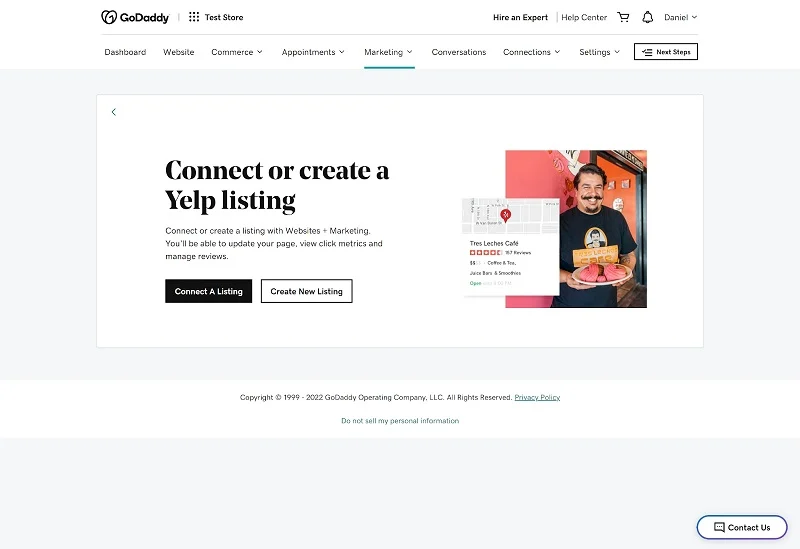
    There is also an interesting business listings tool that you can access from the main dashboard. This allows you to create Yelp and Google My Business listings. You can also link to your social media pages and get tips on when to post.
    GoDaddy’s AI prompt library

    GoDaddy’s new Generative AI Prompt library can provide unique support to small businesses. Business owners can use 35+ prompts and leverage the power and insights of generative AI. Users can interact with AI chatbot systems like ChatGPT, Google Bard, and Bing AI to create content that can automate tasks like content creation, social media management, and customer support. You can even get help starting a business and tips on creating a website.

    The library aims to level the playing field for small businesses by giving them access to technologies that are usually reserved for large corporations. Tips can help small businesses with common tasks like generating marketing ideas, responding to customer feedback, and creating content. The library will continue to grow throughout 2023 and GoDaddy plans to add innovative new features to its products.

    It is important to note that since AI technology is relatively new and still in development, all generated content must be vetted and reviewed before use.

    How to create a website with GoDaddy

    When you start a new GoDaddy site, you’ll need to select a site category and enter a site name. With the free trial, you will have free access to all features for the first week. After that, you can choose a paid subscription if you want to continue using all of GoDaddy’s features. Or you can upgrade to a free forever plan with limited features without losing your work. You can always update later too.

    After you’ve submitted your site, you’ll be asked a few questions so GoDaddy can provide you with the appropriate template and recommended sections based on what works best for similar businesses. You can also change your template at any time during the editing process without having to start over. There’s even a mobile editor so you can make changes to your site on the go.

    There are hundreds of templates that are divided into 2 categories:

    You can add and remove both options and elements from your site using the intuitive editor. You can automatically import your logo, fonts, and colors into an image to keep your branding consistent.

    One of the features is GoDaddy’s auto backup tool. to do so with a member.

    Fortunately, GoDaddy has spent a lot of time analyzing what users do to build successful websites, providing a guide to easy-to-follow checklists to ensure new users see the steps they’re taking based on their goals. You can then preview your site before publishing it with one click.

    The pros and cons of GoDaddy’s editor are that you can’t add custom code and there are no keyboard shortcuts. After all, it is difficult to export a GoDaddy website to a platform.

    General Union, I like GoDaddy. It lacks power if you’re looking for an advanced web builder, but it’s a great option for users who want to get online quickly. GoDaddy doesn’t have all the plugins or flexibility that others do, but their tools are fully integrated with the builder, so you’ll never be left with a site that doesn’t look or work as it should.

    Adding Multimedia to Your GoDaddy Website

    You can upload images to your website as embedded media. Instagram and choose which media to sync with your website.

    You can remove backgrounds and edit media with GoDaddy Design Studio, create new videos with the Instant Video tool, upload videos to YouTube and Vimeo. The integrated editing tools are great.

    Marketing Functionality with GoDaddy Websites

    You’ll get a wide variety of marketing tools with a GoDaddy website builder subscription. and include marketing email marketing tools, a native content creator, a powerful marketing planner; :

    Additionally, powerful analytics are available to track the success of these campaigns;

    SEO Functionality & Add-Ons with GoDaddy Websites

    GoDaddy has a native SEO wizard that you can use to optimize your website for search engines like Google. analytics so you can track the success of your SEO efforts.

    In the past, GoDaddy’s SEO features had a history of slow performance and slow speeds. A few changes back then doubled the average score of passing sites, and the company is now well ahead of the competition.

    Ecommerce

    GoDaddy website builder has an impressive online store feature that makes it easy for users to sell their products online. The online store is equipped with everything a user needs to get started with eCommerce, including a variety of customizable templates, seamless integration with marketplaces like Etsy, Amazon, Google, and more, and an easy-to-use interface that makes setup a breeze. . store and manage inventory.

    Adding products to your online store is quick and easy with AI-enabled product descriptions that suggest content when you look at a blank screen and a quick import feature if you sell elsewhere. It will even sync your inventory between multiple selling sites so you only have one place to manage your inventory.

    GoDaddy also has built-in tools to help you sell more, like automated email flows to retarget customers with an abandoned cart, the ability to create social media posts that you can sell directly from, and a chat feature to stay in touch. with your clients. . The publisher will also suggest and create other resources on your site, such as FAQs, that are used by e-commerce companies.

    Payment Processing

    GoDaddy’s online store offers a secure payment processing system that supports multiple payment options, including major credit cards, PayPal, Apple Pay, and Google Pay, and offers a streamlined facility for in-person payments. Users can also customize their checkout process to match your brand, ensuring a seamless customer experience. GoDaddy also has the lowest processing fees, allowing customers to keep more of what they earn.

    Scalability

    With GoDaddy, users can start small and easily add more products and features as their business grows. It offers seamless integration with popular carriers, making shipping and handling easier for users as their online store expands. In addition, GoDaddy’s online store offers easy-to-use marketing tools that help users attract more customers, including customized coupons and promotions and email marketing campaigns.

    GoDaddy Customer Support

    GoDaddy offers 24/7/365 live chat and phone support. Their award-winning support agents are responsive and knowledgeable, and you’ll rarely have to wait more than a few minutes for a response. However, there is no email support.

    Another great resource is GoDaddy’s knowledge base, which contains a variety of step-by-step guides, video tutorials, and other self-help articles. You’ll also find a selection of educational webinars, and GoDaddy’s community forums let you interact with other users and see answers to previous questions.

    GoDaddy Pricing

    How Much Does GoDaddy Website Builder Cost?

    GoDaddy has a four+ site marketing plan. All of them have a seven-day free trial so you can test the platform. There is also a simple, forever free plan, although it lacks advanced features.

    The basic plan allows you to create a simple website and provides access to email. An upgrade to the Premium plan adds a full set of online meeting tools, while the Commerce and Commerce Plus packages are designed for e-commerce.

    Monthly subscriptions are available, but you’ll get a significant discount with a 12, 24, or 36-month plan. You’ll also get a better sales price during your initial term with the annual plan.

    GoDaddy and Webador

    Webador is more affordable than GoDaddy, but offers a little more basic website building solutions. Like GoDaddy, it is intuitive and easy to use. However, its ecommerce tools are basic and it lacks email marketing functionality. Overall, we recommend GoDaddy unless you’re on a tight budget where every penny counts.

    GoDaddy vs. Wix

    Wix is probably the most powerful website builder in the world and offers great design flexibility. However, it is a little more difficult to use than GoDaddy and is a better option if you want to spend some time customizing your site. GoDaddy packages are also more complete and the price includes all the tools: marketing, dating, store, while Wix tools often come with an additional cost that is only apparent once you are in the market after building your place. We suggest using GoDaddy if getting online quickly is your priority.

    GoDaddy versus Shopify?

    Shopify is a leading online store builder designed specifically for eCommerce. GoDaddy’s tools are better integrated, so you don’t have to spend a lot of time trying to get those tools to look and work the way you want. There is a learning curve with Shopify and many rabbit holes where you will not receive support. It’s a powerful option if you specifically want to create your own store, but GoDaddy stands out as a much better option for more general business and personal websites.

    GoDaddy and Weebly

    Weebly is a versatile website builder that, like GoDaddy, has a mix of website building tools and online stores. It’s also pretty easy to use, although not as simple as GoDaddy. However, it offers more design customization, which is good. We recommend Weebly for online stores that may be too large for the GoDaddy platform.

    Bottom line

    The GoDaddy website builder is a versatile option that perfectly suits users of all levels on their eCommerce journey. With an easy-to-use editor and AI tools that require no coding or specialized skills, you can effortlessly create a powerful online store. With a selection of eCommerce and online booking tools, GoDaddy equips you with everything you need to succeed in the competitive online marketplace.

    GoDaddy remains competitively priced, making it an attractive option for entrepreneurs. Additionally, new users can take advantage of a seven-day free trial, allowing them to experience its capabilities firsthand.

    Experience the convenience of the GoDaddy website builder and unleash your online success with confidence.

  • Shopify POS System Review 2024

    Shopify POS System Review 2024

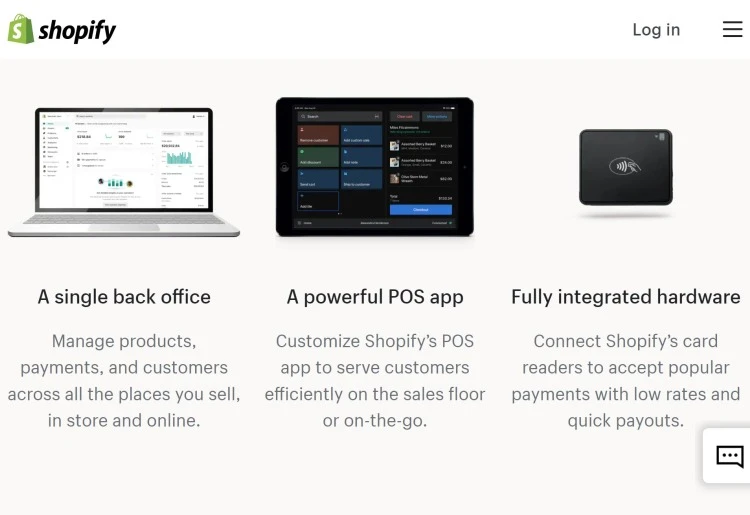
    Shopify is a leading e-commerce company that offers a point-of-sale (POS) system that integrates with its online retail platform. Whether you sell online with Shopify or not, you get access to the same intuitive interface to manage orders, inventory, and staff. Using Shopify’s own hardware makes it easy to accept payments, while the POS app works on both iPad and Android and can be customized to suit your needs.

    Visit Shopify

    Pros

    • Easy to get started and intuitive to use
    • Integrates with your online Shopify store
    • Comprehensive inventory management tools.

    Cons

    • High monthly costs if you operate from multiple locations
    • I can only accept cash payments without an internet connection.

    Ideal For

    • Small and medium-sized retailers looking for an easy-to-use POS system
    • Existing Shopify customers who want to sell in person and online
    • Companies looking to adopt a multi-channel approach to customer service

    Why Go With Shopify POS

    Shopify’s POS system is designed for different types of businesses, providing a personalized experience, whether you’re running a multi-store, one-stop shop, or selling at events. Shopify POS is built on the Shopify eCommerce platform, which means you get access to an easy-to-use dashboard and all the tools that millions of online stores use. Shopify POS offers a customizable mobile app that’s suitable for a variety of devices, including iPad, iPhone, and Android.

    With a variety of pricing tiers available, you can choose a plan that meets your immediate business needs while maintaining the flexibility to upgrade or downgrade as needed. While the main reason to choose Shopify is its integration with its online platform, there is a Lite package available for those just looking for a POS solution. No matter which plan you choose, you will need to purchase point-of-sale equipment. This can be purchased directly from Shopify, meaning it should work perfectly with your tablet and the Shopify POS app.

    Shopify’s customer support is excellent. Their tutorials, knowledge base, and community forums make it easy to learn about their platform. So, even if problems arise, you can be sure that you will have the solution at hand.

    What’s On Offer

    • Omnichannel sales ensure a consistent experience for your online and offline customers.
    • The platform provides integrated tools for digital marketing, delivery solutions and more, providing a comprehensive solution for businesses.
    • Product and inventory management to stay organized and reduce errors.
    • Includes support for offering discounts, returns, refunds and exchanges.
    • Reports and analytics so you can make informed business decisions
    • Customer profiles to track lifetime purchase and spending history
    • Monthly pricing plans with no hidden costs
    • Integrated one-time payment process
    • 24/7 support via chat, phone and email

    Ease of Use

    Shopify POS offers an optimized multi-store experience, ensuring that businesses can efficiently manage sales across multiple locations.

    One of the strongest features of Shopify POS is its ease of use. There’s no complicated application process, meaning you only need an email address to sign up.  If you’re familiar with Shopify POS or want to explore its options, you can start setting things up yourself right away. Otherwise, multiple prompts guide you through a series of setup steps.

    When going through the setup process or contacting customer service, you must provide your name and phone number.

    If you ever get stuck, Shopify has many support options. Its knowledge base and community forum can guide you through most issues, while email and live chat support are available if you run into a more complex problem.

    So if you’re getting started with Shopify, you’ll find:

    • Simple registration procedure
    • A setup guide that makes it easy to get started
    • A comprehensive knowledge base, active community forum, and YouTube channel answer most questions and help you learn how to get the most out of the platform.
    • Clean and intuitive interface

    What’s Unique About Shopify POS?

    Naturally, Shopify POS features seamless integration with your online retail platform. Millions of businesses use Shopify to power their eCommerce sites. it is an established and reputable option. Shopify has applied the experience gained online to its POS systems. If you’re looking for a one-stop solution for managing your inventory and selling products online and in person, Shopify is worth serious consideration.

    Even if you just want to use a point of sale system, you will benefit from the features they have created for online retailers. For example:

    • Easy-to-use product and inventory management tools
    • Analytics and reports that provide a wealth of data you can use to inform future business decisions.
    • Payment options that allow you to set special discounts and automatically calculate taxes based on your store location.
    • Customizable mobile app that works on iPad, iPhone and Android devices

    For those investing at the highest levels, more advanced features include:

    • Omnichannel retailing to deliver a better customer experience. This allows options such as pay in store and ship to customer, buy online and pick up in store, and allow online returns and exchanges for items purchased in person.
    • Smart inventory tools to predict demand, alert you to stock shortages, and make recommendations on sale items.
    • Staff management works with the ability to assign sales to staff members for commissions.

    You can buy point-of-sale equipment like card readers and barcode readers directly through Shopify with free shipping and a 30-day return policy. Buying outright ensures that plug-and-play hardware is compatible with the Shopify POS app. The app has a customizable smart grid interface that lets you configure the tiles to display the features you need.

    Shopify has a great support ecosystem with guides and tutorials on how to easily use their platform. You can also find free business tools and additional learning materials through YouTube and Shopify Learn. Shopify Experts allows you to get quotes from recommended freelancers and agencies, allowing you to hire additional support to get the most out of the platform.

    Customer Support

    Shopify’s customer support is usually very good, although you’ll usually be able to find the answers you need without waiting on support calls. The Help Center is a knowledge base with guides that provide solutions to common problems. The community support area is a comprehensive forum that answers almost any question. These answers come from other users who will have the same problems as you.

    If you do not find a helpful answer in the help center, you will receive an email form to contact the support team. Shopify’s support team is available 24/7 via email, live chat, and phone.

    Pricing (Software and Hardware)

    Shopify POS lets you sign up for a 3-day free trial with no credit card required. Then you can get three months of Shopify for $1 per month, no matter which package you choose. It’s worth noting that you can get the best deal by paying annually, as this guarantees a 25% discount.

    The Shopify POS hardware is ready to use with no contracts or credit checks.

    If you want to use Shopify for your online sales and Shopify POS system, plans are available for $39, $105, and $399 per month. Each of these plans includes Shopify POS Lite to accept payments in person.

    You can also choose more industry-specific plans, such as the $5/month Starter plan if you sell strictly on social media or the $89/month Retail plan if you’re a storefront seller who needs a simple online presence. .

    Contract Terms

    Shopify’s 3-day trial allows you to test the POS system before you provide all your details and commit to payment. Shopify plans are monthly unless you sign up for a long-term deal. Once you sign up, you’ll be offered one-, two-, and three-year discounts at lower monthly rates.

    If you use Shopify’s online services, you will need to use the same payment processor when using their POS service. If you decide Shopify POS isn’t the right solution for your business, you can cancel at any time and still keep your online services active.

    Bottom Line

    Shopify’s POS system integrates seamlessly with its popular e-commerce platform, offering businesses a unified online and in-person sales solution. It targets small and medium-sized retailers with features such as omnichannel sales, comprehensive inventory management and strong customer service. While price may be a consideration for some, the value delivered, especially for those already using Shopify to sell online, makes it a compelling option. Shopify is certainly a valuable POS system for businesses looking for growth and streamlined operations.

    About Shopify

    Founded in 2006, Shopify is one of the leading online sales platforms. The Canadian company offers a variety of e-commerce services such as payment, shipping and customer engagement tools. Since 2013, Shopify has been providing POS systems, allowing online retailers to use the same platform for in-person sales.

    The all-in-one e-commerce platform is used in more than 175 countries. Over 3.7 million websites use Shopify, including big brands like Gymshark, Heinz, Tupperware, and Netflix.

  • Keen Psychics Review (2024) Is It Legit or a Waste of Time?

    Keen Psychics Review (2024) Is It Legit or a Waste of Time?

    Keen Psychics is an immensely easy-to-use website for psychic readings. The clean and elegant design makes it easy to navigate the website to find just what you are looking for. With more psychic advisors than most sites, live readings are available 24/7/365 with just a few clicks of a button. Rated as one of the most reliable and affordable options, Keen is often famous for psychic readings.

    Visit Keen

    Keen Pros & Cons:

    PROS

    • Lowest rates available: As low as $1.99/min
    • Trustworthy readers:
    • Money-back guarantee:

    CONS

    • No video chat options
    • Fewer reading options on the app

    Overview

    Keen Psychics has a rating of 4 stars from 140 reviews, indicating that many customers are generally satisfied with their services. However, while the platform scores well in ease of use with a rating of 4, it has received slightly lower scores in brand satisfaction, value for money, and service quality, all at 3.5.
    This suggests some areas of improvement for the brand in terms of overall customer satisfaction.

    How Keen Psychics Works

    How easy is it to sign up?

    It is easy to sign up and create a Keen account. To register, click the Register button in the upper right-hand corner and enter your email address.

    What personal information do you have to provide?

    Keen.com does not require personal information; you only need an email address and password to create your account. Of course, you must also add a payment method before contacting the reader.

    Keen Features and Tools

    • The Get Matched tool helps you find an avid psychic who can provide precisely what you want.
    • Keen’s Review and Rating System is the best of all psychic sites. Since users generate prices and reviews, they accurately reflect the services provided by each Keen psychic.
    • Excellent horoscopes and articles are available to explore, learn, and ponder for personal insight.
    • Featured Psychic Tips Videos include basic online psychic reading dos and don’ts, what to do after a psychic reading, how to get the best reading on a budget, and when to ask specific questions.

    How to Choose a Reader at Keen

    What types of readings does Keen offer?

    There is a wide variety of readings, such as Tarot Cards, Psychic, Financial Insights, Life Importance, Spiritual Readings, Mediumship, Love Life and relationships, Astrology (Western, Vedic, Mayan, Chinese), Dream Interpretation, Feng Shui, Numerology, Animal Psychics, angel and aura cleansing, and more. There are also readings in Spanish.

    What type of reader information is available?

    It is up to the reader to provide information. Therefore, not all readers will complete all profile sections. However, the top-rated psychics have a brief introduction, background information, and reading approach, which describes their style and method of doing things. Some lists present the reader’s specialties, skills, procedures, and languages.

    Are there customer reviews of readers?

    Yes. Most Keen advisors have user reviews, and some have hundreds, if not thousands, of them. While many users thank the psychic, some go into more detail or warn others about bad experiences. The nice thing is that you can see if the user had a reading over the phone or via chat, which can help you decide what type of reading to book.

    The reader’s reading habits, the number of published reviews, and the year they began advising on Keen are also disclosed.

    How easy is it to book a reading?

    Booking a reading at Keen couldn’t be easier. Button icons indicate whether an advisor is available for a phone or chat reading. When the button is green, the reader is immediately available. When the button is gray, the reader cannot be contacted.

    If the reader is currently unavailable, you can arrange a call or chat for the psychic to contact you when they are available. The process differs for call and chat arrangements but is simple.

    Arranging a call

    You can schedule a call with multiple psychics at once. You can connect when the psychic is available as long as you have funds to cover at least one minute of conversation. However, this does not guarantee that the psychic will contact you for a specific period, but you can limit how long he is willing to wait.

    You are given an estimated wait time based on the average length of the Keen psychic call and the number of customers in line.

    Arranging a chat

    You can only set up one chat at a time. There is no guarantee that the chat will happen, and the request expires after 24 hours. Accepting SMS text notifications when the reader is ready would be best. Once you receive a text message with the chat link, you’ll have two minutes to log in and start the chat before the reader moves on to another customer.

    As with calls, you are given an estimated wait time based on the average length of the Keen psychic conversation and the number of customers in line.

    How can you connect with Keen advisors?

    Interesting readings are available by phone, chat, or email. The chat system is an instant messaging platform, and emails are sent through Keen’s custom messaging system (not through your regular email).

    How can you block or unblock an advisor?

    If, for some reason, you do not want to be connected to a reader, you can always lock or unlock a reader. Once blocked, you will no longer receive messages from Keen advisors, nor will you be able to call or chat with them.

    To block an advisor, visit Mail, select OpMails, and then choose Block an advisor. EnteMailur username and chMail Block.

    To unblock an advisor, visit Mail, select OpMails, and then choose Block an Advisor. UndeMaillock User, select Mailadvisor’s username, and select Unlock.

    Can you leave feedback or rate an advisor?

    After reading with Keen advisors, you have fourteen days to leave a review. Once published, written comments and opinions are visible on the reader’s profile for 12 months. The phone call must last four minutes (not including the three promotional minutes) to leave a review.

    You can only leave one review per day, so if you talk to two Keen.com advisors in one day and review one later, you’ll have to wait until the next day to leave a review for the other Keen psychics.

    Can you create a favorite list?

    You can create a list of your favorite psychic readers if you have found ones you connect strongly with. To add a reader to the list, all you have to do is click the heart-shaped icon next to the reader’s profile photo. Readers are also automatically added to your favorites list after you’ve read with them.

    Can you ping your advisor?

    Yes. You can use Keen’s Ping feature to send instant messages to advisors you’ve connected with before.

    Seafiremoon, a first-level psychic at Keen Psychics, offers a combination of astrological and tarot reading skills. With an impressive rating of 4.9 from more than 2,300 reviews and 12,873 readings since 2005, his experience is well known.

    Seafiremoon specializes in diverse areas, including career, money, destiny, and personal relationships. His skills extend to clairvoyance, clairaudience, and empathy, using tools such as tarot and occidental astrology.

    Clients have praised Seafiremoon for their honest, useful, and detailed readings. One outstanding review emphasizes their ability to provide astrological explanations and in-depth tarot readings, recommending them highly to others.

    Seafiremoon and Keen Psychics’ services cost 6.95 dollars per minute. In addition, there is a special offer for new clients that offers 5 minutes of reading for 1 dollar. This offer allows clients to experience their services at a significantly reduced price before committing to a session at full price.

    Is Keen Legit?

    How does Keen screen potential physic readers?

    The only evaluation that Keen realizes for psychic readers is identity verification. Cualquiera puede decidir oferer sus servicios en Keen siempre que compla con el Acuerdo de usuario.

    What’s the process for becoming a reader?

    Los psíquicos pueden abrir una cuenta de immediato en Keen yendo a la sección Dar consejos en el sitio web. It takes about 30 minutes to create a list on the site, verify your identity, and provide payment information. Once your profile is complete, the psychic receives a free number to start receiving client calls and chats.

    Do Keen psychics work for the company?

    Keen provides a platform for psychic experts and clients to connect. Los psíquicos enthusiatas son contratados como contratistas independientes. The site offers all communications and services.

    How do users feel about Keen?

    In general, users have given positive reviews to Keen. Since its launch in 1999, Keen has provided services to more than 14 million people, providing 42 million readings. There are only a handful of complaints in the Better Business Bureau (33 to be exact), which means that most users are satisfied. Multiple sources have also qualified Keen as the number one choice for online psychic services.

    Keen Mobile

    Does Keen Have an App?

    Yes The application Keep is available through the Apple App Store and the Google Play Store. Se puede descargar gratis y puede utilizador su cuenta de inicio de sesión existente de Keen.

    The application is very easy to use and has characteristics similar to Keen’s psychic website. The functions of the Keen application include connecting with psychic readers, viewing psychic profiles, organizing calls and chats from the mobile phone, and a free horoscope Keen diary, which can be shared on Facebook, WhatsApp, Mail, and SMS. Mail can also leave comments from the readers Mailt the application.

    However, the app has Mailer options for psychic readers, as not all categories are listed. The app’s available categories are Strict Astrology, General Sessions, Love & Relationships, Mediation, and Tarot Reading.

    While you can still access your first customer’s special offer, the Keen app does not offer additional offers or promotional codes for returning customers.

    Keen Support & Customer Service

    Keen’s excellent customer service is one of the reasons it’s one of our top picks for online psychics. You can either fill out an online form with your question and problem description or call Keen’s customer support number (877-533-6435).

    Active customer support is available.

    Monday-Friday. 6:00 AM – 6:00 PM PST

    Saturday – Sunday: 8:00 am – 4:30 pm PST.

    In general, you can expect a response within one business day.

    In addition, Keen.com has many FAQ pages for various topics, from their satisfaction guaranteed policy to psychic counseling. In each section, Keen’s policies are clearly laid out in a question-and-answer format, highlighting the most frequently asked questions.

    How to Get a Refund From Keen

    You can request a Keen refund for an unsatisfactory experience once every 30 days, and it must be done within 72 hours of reading.

    How easy is it to request a refund?

    Keen’s website makes requesting a refund very easy. The form can be found on the Satisfaction Guaranteed page. Once on this page, you will be asked to explain the details of your complaint.

    If Keen determines the request is valid, a refund of up to $25 will be credited to your account. Refunds are not given; they are deposits in Keen Dollars.

    How long does it take to get a refund?

    Keen will typically process the refund within 1-2 business days, and the credit can be used to pay for another reading.

    Pricing

    Keen has a pay-by-the-minute pricing structure. Readers choose their price per minute, ranging from $1.99 to $30. This offers a range of prices within your budget. The payment structure is straightforward, and no value packs, bundles, or wholesale credits are available.

    As an introductory offer, you can choose either three minutes or ten minutes for $1.99. Keane suggests the second option, arguing that it’s a better deal in most cases. The first option would be better if the reader has a very high price per minute.

    Best payment methods

    • Credit card (Visa, Mastercard, Discover, American Express)
    • Debit card
    • PayPal:
    • Prepaid Gift Cards
    • Price and special offers

    Do you have to deposit funds before being able to choose a reader?

    Forks! Funds must be deposited using your chosen payment method before contacting the reader. However, you can browse the site, view all psychic readers’ profiles, and take the Match Me questionnaire for free. The price is clear: You won’t be charged until you find a consultant.

    What payment methods are accepted?

    Keen.com accepts PayPal, credit cards (Visa, MasterCard, American Express, Discover), and prepaid debit or gift cards. However, all payment methods must be issued in your name and authorized for personal use only, which may be restrictive for some people. Payment methods classified as business, corporate, or commercial are prohibited.

    Keen Psychics Alternatives

    How Does Keen Psychics  Compare to Other Psychic Reading Sites?

    Like most other psychic reading sites, Keen’s price per reading is set by psychic readers and can change significantly depending on who you choose.

    However, their starting prices are among the lowest. Keen gives you the freedom to decide whether you want your readings by phone, chat, or email, which is a significant advantage when you’re on the go and want a quick reading but can’t talk on the phone. Keen’s special offer of the first 3 minutes free is hard to beat, and only Kasamba can keep up.

    Keen vs. California Psychics

    Keen and California Psychics are two leading psychic reading sites, but Keen has some advantages over California Psychics. First, Keen has a better introductory rate, offering $1.99 for 10 minutes, compared to California Psychic’s discounted introductory reading rates, which range from $1 to $4 per minute plus an additional code for 5 minutes free.

    Secondly, Keen offers readings by phone, chat, and Mail. In California, Psychics only provide readings by phone. The better price and variety of mail reading types give Keen an edge over California Psychics.

    Keen vs Psychic Source

    Keen and Psychic Source have unique advantages. Keen offers the best introductory reading rate at $1.99 per 10 minutes compared to the $1 per minute introductory value pages for 10, 20, or 30 minutes offered by Psychic Source. However, Psychic Source offers the option of video chat, which is not available with psychic readings at Keen.

    For parts, Keen is a better option for phone or chat readings, but if users are looking for face-to-face interaction, it might be better to opt for Psychic Source’s higher rate.

    Keen vs Kasamba

    The most significant difference between Keen and Kasamba is the type of readings offered. Kasamba only offers online chats for psychic reading, while Keen provides online chat, Mail, or phone. Mailn and Kasama’s prices are beautiful. Mail new users. Keen ofMail is $1.99 for the first 10 minutes, while Kasamba offers three free minutes and 70% off the first session (up to $50).

    Both introductory rates are better than most other psychic reading sites; therefore, the reading users are looking for will determine which site is best for them.

    The Bottom Line

    Keen.com stands out for its trustworthiness and trustworthiness. With so many readers, advisors are always ready to take a call or chat. Their customer service policies are clearly defined, making the site easier to use. Keen makes everyone feel in good hands, both advisors and users.

    The advisors’ happiness speaks to Keen’s level of quality assurance, and a satisfied reader is certainly a good sign for the user when determining the value of a psychic brand.

    Keen is simple, evident in its clean and informative website. Since only phone calls, chats, and Mail are available, the reader and user maintain a sense of privacy and discretion. You can easily find the right psychic service at a price that fits your budget by checking Keen’s honest user ratings and psychic reviews.

    Keen and his readers have integrity from start to finish. This honesty is also reflected in the simple pay-per-minute pricing system with no pressure for add-ons, bundles, or confusing credit systems.