PdfFiller is a browser-based document management tool aimed at both individual and enterprise users. The end-to-end PDF solution allows you to do everything from editing to securing to sharing and storing your PDF files from its simple web interface.
This web-based tool makes it easy to edit, secure, convert, and share forms and documents.
Pros
Intuitive web-based interface
Robust security options
Lots of business-ready capabilities
Cons
Business features won’t be needed by some users
Requires annual commitment to get best value
To open a PDF, you can drag and drop the file directly onto pdfFiller’s home page. Alternately, you can upload files from your hard drive or from Google Drive, Dropbox, OneDrive, Box, a URL, or pdfFiller’s own online document library. You can also import a PDF from email by sending the file yourself or requesting it from a third party.
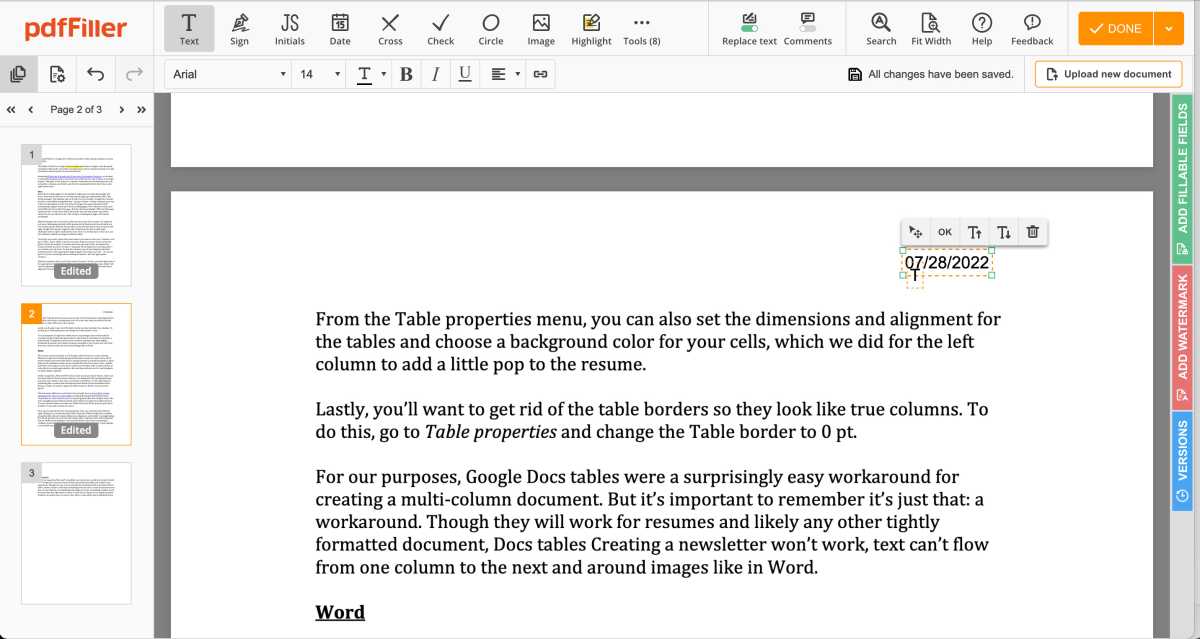
You can simply drag elements like text boxes, shapes, and the date to your PDF.
Michael Ansaldo/IDG
The editor enables you to work with PDFs much as you would with a Word document, allowing you to add, delete, and copy/paste text, change font style, size, and color; and so on. It also offers a standard set of markup tools. You can highlight, erase, or redact text; add sticky notes and comments; and scribble marginalia.
Form hosting
PDFs are often used to distribute contracts, questionnaires, and other types of forms. pdfFiller allows you to create, host, and edit these as easily as Word-style documents. You can also collect payments through PDF forms by linking a payment gateway.
Document library
One of pdfFiller’s most impressive features is its document library. If you can’t create the document you need from scratch, you can likely find it in this trove of government, legal, and business forms, any of which can be downloaded and customized to your needs. You can also save any document you create as a template for reuse.
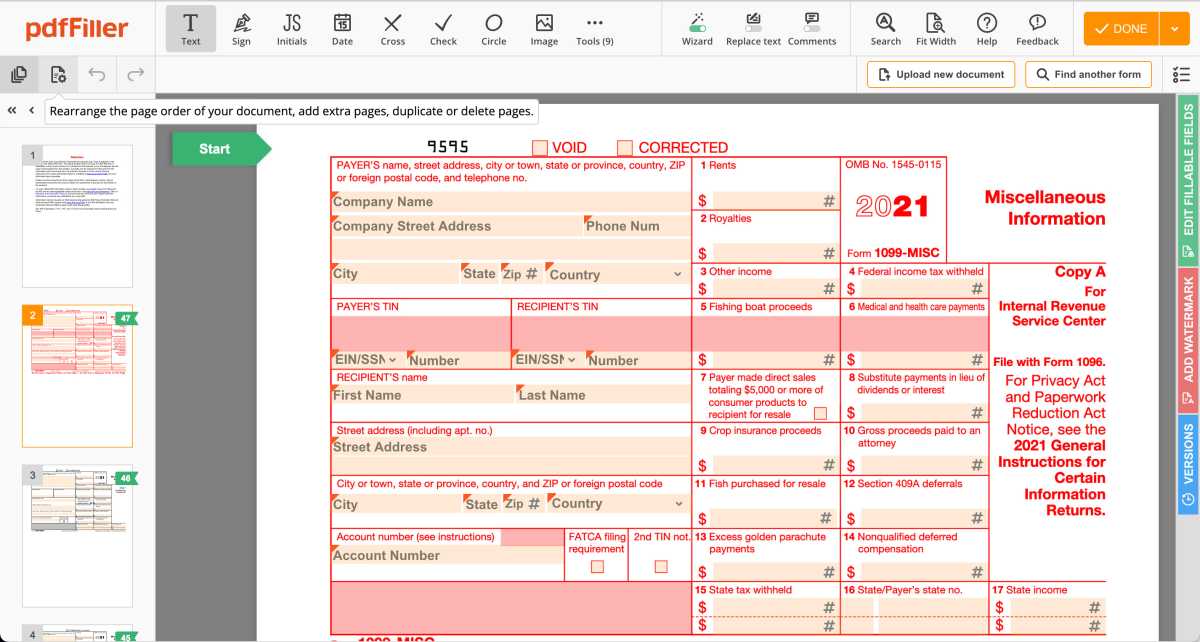
You can create PDFs from a library of government forms in pdfFiller’s document library.
Michael Ansaldo/IDG
Sharing
Once your PDF is edited, you can securely share it with teammates through a link. You can also send it via email, text, fax, or USPS, or have it notarized directly from your pdfFiller account.
Encryption and security
pdfFiller offers robust encryption & security features for users that frequently handle sensitive data. Documents can be locked in an encrypted folder and require two-factor authentication for access. The editor offers dedicated HIPAA compliance settings to ensure patient healthcare information is protected according to standards outlined by the Health Insurance Portability and Accountability Act. It also helps keep track of your account activity with an Audit Trail feature that shows which forms you’ve opened and shared, what time you logged into and out of your pdfFiller account, and other user activity.
Verdict
pdfFiller is an incredibly versatile PDF editor with an uncommonly deep set of features. Not all of them will suit everyone, but fortunately, pdfFiller offers three subscription tiers that logically tailor features to different users.
The Basic plan is best suited to individuals. It provides standard PDF editing and annotation features, cloud storage for PDF files, and customer support within a day for $20 month-to-month or $8 a month with an annual commitment. The Plus plan adds the ability to create reusable templates; merge, rearrange, or add pages; and add basic fillable fields, plus support within an hour for $30 month-to-month or $12 a month with an annual commitment. The Premium plan includes all the features of the Basic and Plus plans and adds e-signature workflows, access to the U.S. Legal Forms Library, and other business-ready features, plus instant chat support. There’s a30-day free trial period, which should plenty of time to determine which plan is right for you.
Editor’s note: Because online services are often iterative, gaining new features and performance improvements over time, this review is subject to change in order to accurately reflect the current state of the service. Any changes to text or our final review verdict will be noted at the top of this article.
Researchers at the University of Southern Indiana say businesses can cut communication costs by more than 55% using a VoIP provider system instead of a landline. Additionally, landlines require bulky on-site equipment and frequent maintenance, limiting agents to the local office, unlike VoIP systems.
Cloud-based VoIP systems eliminatethe need for local hardware, allowing users to make calls over the Internet. These networks are easy to configure, provide excellent call quality and have a wide range of communication capabilities. Each company offering this service has pricing plans, features and calling zones.
We’ve ranked the top 10 VoIP providers in 2023 to help you make a more informed decision and determine which company best suits your needs.
Comcast Business – Best for creating custom call groups for sequential dialling
Our Methodology: How We Reviewed the Best VoIP Providers & Services
We use the same comparison factors to provide fair ratings for each of the 10 VoIP providers listed in this review. However, depending on your business needs, some features will be more important to you than others. To evaluate and rank the best VoIP services for enterprises, we consider the following essential features of the Voice over Internet Protocol system:
Characteristics
Collaboration tools
Ways of communication
Queue and routing control
Analysis and monitoring tools.
Unlimited and international call coverage.
Supported integrations
Prices:
Easy to use
Our 10 Best VoIP Companies & Services
1.RingCentral
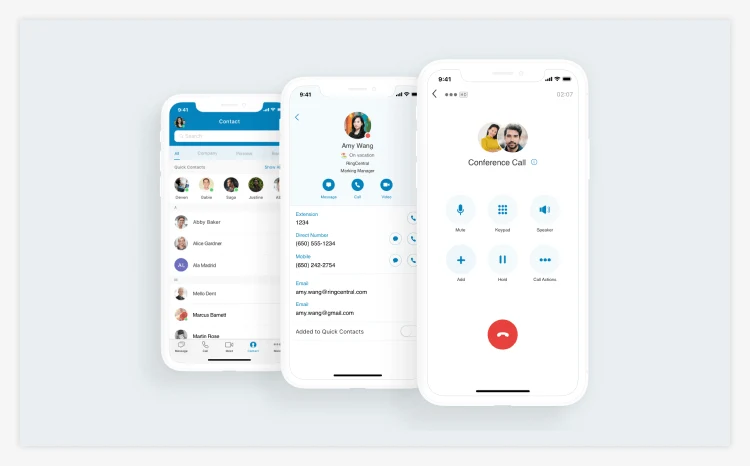
RingCentral MVP is a team-oriented UCaaS (Unified Communications as a Service) platform with built-in collaboration tools such as VoIP calling, SMS messaging, team chat, and video conferencing.
The platformallows users to invite each other via email and create a personalized phone system with voicemail transcription, call recording, and adaptive interactive voice response (IVR) menus for self-service routing. You can also create dozens of team chat channels where members can message each other, send images, share files, and assign tasks with deadlines.
H.D. video meetings host up to 200 participants and are supported by AI-powered tools. These include automatically generated information, background noise reduction, live transcription and collaborative artboards.
According to Swanson Senior Director of Customer Service Emma Grotluschen, the RingCentral Contact Center enables your entire team to “improve” [their] customer service performance. He adds, “Report” ng capabilities help us continuously monitor and improve our performance, and with automatic call recording, our managers have tripled the number of calls they can review.
Why w” chose RingCentral MVP? RingCentral MVP offers VoIP plans with a complete, shared UCaaS platform suitable for businesses large and small. All plans also allow unlimited calling within the U.S. and Canada.
Our experience. we loved how we were able to set it up in minutes. The RingCentral app was also easy to use and allowed our team members to interact instantly through a variety of mediums.
PROS
Features of shared videos
File management features
International VoIP numbers
CONS
The Essentials plan has a maximum of 20 users
There are no unlimited international calling options
2. Vonage
Vonage is a UCaaS platform that offers VoIP and SMS, live chat and video features.; These three features are becoming increasingly popular among younger audiences. Its enterprise communications platform has basic phone functionality and collaboration tools.
Vonage’Vonage’sp, browser, and mobile apps come with standard calling features, including automatic attendantrouting and call management tools such as hold, transfer, and call park. Multichannel business queues and inboxes are also available as add-ons.
This serviceservice’sessaging allows individuals and groups to communicate easily. Video calls come with collaboration features like whiteboards with up to 20 participants, team chat, waiting rooms, and integration with calendar apps for scheduling.
Headphones.com Strategic Partnerships Manager Kevin Peña says: “Since “oving to Vonage Business Communications, we have team members who work at home stations, office stations, or both, and they can access our VBC accounts seamlessly wherever they are. They can make or receive calls from a mobile phone as easily as a desk phone with a simple, easy-to-use interface that keeps calls, voicemails, and messages all in one place.”
Why w” chose Vonage. Vonage Business Communications offers simple, easy-to-use VoIP features. Every plan includes Vonage Meetings with voice, video, and messaging collaboration.
Our experience. we loved Vonage’Vonage’scollaboration whiteboards and team messaging. Its click-to-call desktop feature was especially handy for spontaneous communication.
PROS
Auto-service functionality
There is no user limit on lower-tier plans
You can exchange live calls between devices
CONS
No analysis
Charge extra for features included in competing plans
3. Zoom Phone
Zoom Phone is Zoom’s Zoom’shone system, not to be confused with its Meetings video conferencing app or Zoom One collaboration platform. Zoom Phone includes team chat and bundles with Zoom One to make collaboration more accessible and intuitive for remote workers. The Zoom app, available for desktops, browsers and mobile devices, combines all of the companycompany’snto one seamless interface, but it also only works with the Zoom Phone.
This phone system is perfect for businesses that want an advanced phone solution without other means of communication. All three pricing plans have the same features, differing in terms of the limited calling area and call pricing structure: a pay-per-minute plan based on the U.S. and Canada, an unlimited calling plan between the U.S. and Canada, and unlimited national calling plans within the U—more than 40 different countries. Unlimited plans and add-ons allow you to make unlimited calls to 19 other countries. Local and toll-free direct dial-in (DID) numbers are available in several countries around the world.
The ZoomPhone system provides access to an extensive library of advanced call centre features. These include unlimited queues, call groups (a group of phone extensions that share incoming calls), call distribution, voicemail transcription, call recording, routing through IVR, and device switching. While Zoom Phone doesn’tdoesn’te analytics, it does offer call centre monitoring with surveillance, intrusion, and supervisor monitoring. Chat and video functionality are standard but can be expanded to include Zoom One as a synchronous UCS platform.
Why did we choose Zoom Phone? Zoom Phone has a wide range of advanced call centre features with unique unlimited global and domestic calling options.
Our experience. We like that Zoom Phone offers affordable pricing plans and unlimited queues, but we wish it had queue analytics for more visibility.
PROS
Unlimited domestic plans outside the U.S.
Add-ons for unlimited calls in 19 countries
Infinite call queues
CONS
Advanced chat collaboration requires a Zoom One subscription
No analysis
4.GoTo
GoTo Connect is a unified communications platform and business phone system that uses VoIP calling, SMS, internal team chat, and collaborative video. It offers virtual phone numbers worldwide, and all plans support unlimited calls to more than 50 countries. This service lets you answer and make softphone calls from the GoTo Connect app on any device. You can also exchange live calls and customize call routing with a drag-and-drop dial plan editor to associate users, voicemails, and announcements.
In addition, you can create call groups with specific routing sequences that can be organized into unlimited call queues. The highest-level Premium plan includes live queue analytics, a control panel with monitoring tools, and agent performance reporting.
GoTo Connect H.D. video conferencing supports up to 250 participants via screen sharing and chat. It allows you to create and schedule video conferences within the system and link them to calendar applications. Want to start an unlimited one-on-one or team chat? You can do that too, along with file sharing, one-click buttons to join a call or video conference, and emoticons.
Why we chose GoTo Connect: GoTo Connect has one of the largest unlimited VoIP calling areas on the market, covering more than 50 countries.
Our experience. We appreciate that GoTo Connect includes unlimited queues and controller monitoring tools for greater visibility. We also like that the system can link scheduled appointments with many popular calendar apps, including Microsoft Outlook, Google Calendar, and Apple iCloud Calendar.
PROS
Unlimited calling space
Orders of rings
Unlimited call queues
CONS
The basic plan limits video conferencing to four participants
Plans are more expensive than some competitors.
5. Dialpad
Dialpad is an AI-enhanced UCaaS platform that offers VoIP phone, SMS, collaborative team chat, and video conferencing. Video conferencing is limited to 10 users, making this provider a great option for small teams.
The phone system supports unlimited calls within the U.S. and Canada and international cloud numbers in over 70 countries. It includes routing and queuing features such as auto attendants, personalized call distribution, unlimited queues, and call groups.
DialpadDialpad’st strength is its A.I. support. All calls have a real-time transcript with automatically generated call summaries that track key themes, sentiment scores, highlights and action items. Agents receive real-time A.I. training, while supervisors can access live queue reports.
Dialpad meetings are limited to 10 users but have collaborative tools like chat, waiting rooms, and whiteboards. You can use the system to schedule meetings in built-in apps like Google or Microsoft365 and invite any user to join without having to download the app. Keyboard chat allowseasy access to file sharing and storage with a search function.
Why did we choose Dialpad? Dialpad has a number of AI-enabled features, including agent training and automatically generated call summaries.
Our experience. We love that DialpadDialpad’s conferencing is loaded with collaboration features like transcription and whiteboarding. We also believe that automatically generated call summaries help streamline the post-call process by making reviewing what was discussed during the call easy.
PROS
AI support
File management features
Affordable plans
CONS
Limited video conference participants
Small unlimited call space
6. Grasshopper
Grasshopper is a VoIP phone system that offers voice calls and SMS. The phone system itself, accessible through a mobile and desktop app, is easy to use.
These service plans support unlimited calling in the U.S. and Canada, and each includes a pre-set phone number limit that you can split between as many agents as needed. GrasshoGrasshopper’s payment structure works well for businesses that want to share multiple phone numbers through multiple extensions. However, all of your available DID numbers have U.S. area codes.
In the Grasshopper app, agents can make calls and send SMS anywhere in the world. They can also access their voicemail by transcribing, displaying, or forwarding calls. Each agent can create a personal greeting that can be configured using the Grasshopper phone number extension to create an auto attendant routing system. These programs support anywhere from three to an unlimited number of extensions.
With this service, you can send text messages worldwide and set up your phone system to send automatic replies to first-time callers, busy signal recipients, and more.
Why did we choose Grasshopper? Grasshopper is best suited for those who don’t ndon’tultiple channels, collaboration, routing, or queuing. Their pricing plans also work well for businesses whose agents need to share phone numbers.
Our experience. We found the Grasshopper app easy to use and appreciated the text messaging capabilities. Although setting up the IVR was confusing, the responsive and knowledgeable customer service team helped us finish it in less than 30 minutes.
PROS
Voice mail
Shared phone numbers
Automated attendant routing systems
CONS
It lacks video and chat features.
There are no international phone numbers
7. Ooma Office
OomaOffice is a VoIP phone system and UCaaS platform with all major communication channels: voice, SMS, team chat and video. The phone system supports unlimited calls in the U.S. and Canada, with per-minute rates anywhere in the world. Ooma also provides local and toll-free U.S. area code numbers.
The Ooma Office app on desktop and mobile devices gives agents access to team messaging, voicemail, call logs, SMS, video, and basic call controls. It also allows you to participate in three-way conference calls and transfer, transfer, park, and divert calls between devices.
Supervisors can create unlimited call queues, call groups, automatic call recording, and self-service auto attendant routes. Administrators can view live and historical call analytics to gain insight into contact centre activity and performance. Agents can share a single inbox when sending SMS messages, dividing responsibility for incoming text messages.
Ooma allows for individual and team channel messaging, and its video conferencing supports screen sharing but lacks collaboration features.
Why did we choose the Ooma Office? It offers a full suite of phone system features, such as routing and queuing. It’s a choice for teams that need a standard UCaaS capabilities platform.
Our experience. From a controller perspective, we appreciate Ooma’s Ooma’s analytics and queue monitoring. We also like that agents can share voicemail boxes and that team chat is included in all Ooma plans.
PROS
Routing and Queuing Functions
Advanced monitoring analysis
Team chat is included in all plans.
CONS
No international numbers
Very few chat and video features.
8. Phone
Phone by Web.com (provided by Phone.com) is a cloud phone system with VoIP calling, SMS text messaging, and video conferencing. It is an affordable platform that offers bundled minutes and unlimited calling options.
The Basic Phone by Web.com plan offers 500 minutes of talk and 1,000 text messages combined, while higher-tier plans support unlimited talk and text in the U.S. and Canada. These more advanced plans also provide useful routing features such as IVR menus, call queues, voicemail transcription, and automatic voicemail-to-email forwarding.
Video conferencing supports up to 100 participants with no time limit. It has dynamic collaboration features such as document sharing, screen sharing, virtual backgrounds, whiteboards and breakout rooms.
All three Phone by Web.com channels are included in every plan, but the best collaboration features, like call recording and breakout rooms, are only available in the Pro plan.
Why did we choose Phone by Web.com? Phone by Web.com offers a cost-effective shared minutes plan for teams with low call volumes and access to video conferencing.
Our experience. We appreciate that Phone by Web.com integrates video conferencing capabilities into all its plans without time limits. We also like that it supports international calling with virtual phone numbers available worldwide.
PROS
Unlimited video length
Call queue functions
Whiteboard collaboration tools for video conferencing
CONS
No team chat
Video conferences have a small number of participants
9.VoxDirect
VoxDirect is a VoIP phone system that specializes in voice and SMS marketing. While it does not include collaboration channels like video or team chat, it does offer text templates and settings to enable push campaigns, notifications, and other mass email use cases.
All VoxDirect plans include one phone number for a toll-free, dedicated, or local VoIP number in the U.S. Subscriptions support unlimited calls within the U.S. and Canada and the ability to make international VoIP calls. Each plan has a predefined number of extensions and virtual receivers, allowing you to share numbers among several users and create a self-service customer routing system. During a live call, agents can record with one click and quickly transfer it. Vox’s uVox’sashboard allows you to manage multiple numbers simultaneously, customize the IVR, set up call recording, and access voicemail with transcription.
The Text panel organizes all text-related tools and functions. It allows you to view your subscribers’ contact information and organize them into groups for various marketing or customer service purposes. You can also create and schedule text messages using text templates (for events, promotions, news, engagement, and notifications) to create drip campaigns and communicate with thousands of customers at once. When a customer responds to a bulk or automated text message, the agent receives the response and can move on to a one-on-one text conversation.
WhyWeose VoxDirect, V:xDirectBulk Text Messaging offers unique SMS marketing options such as sales and advertising templates, autoresponders, and scheduled text messages.
Our experience. We found it easy to schedule text messages using VoxDireVoxDirect’sive library of SMS templates, which cover usage categories such as greetings, promotions, notifications, and standard autoresponders.
PROS
Text templates for marketing.
Easily managed contact lists
Free and personalized numbers
CONS
Limited call analysis
No chat or video
10. Comcast Business
Comcast Business Voice offers a VoIP phone system that you can use on any device (mobile or desktop). It has local numbers worldwide and the option to port existing numbers.
Your Business app does not support text messaging, team chat, or embedded video. However, Comcast’s interface has useful call monitoring and routing tools, such as call ID and history, call hold and transfer, call forwarding, parking, retrieval, and waiting.
With this service, you can create groups with specific call orders so that users are dialled in sequence until someone answers. You can also set business hours and forwarding rules, where each agent has a virtual voicemail inbox with a personalized greeting, transcription and one-click callback.
Why we chose Comcast Business: Comcast Business lets you purchase SIP and PRI trunks to add phone lines or fully migrate to an on-premise VoIP system. Additionally, if your business is looking to transition from an old PBX system that connects your phone system to users via landline cables, Comcast can facilitate this transition.
Our experience.ComcastBusiness made the transition from a basic landline phone system easy because it didn’t need us to learn a new interface or use new tools.
PROS
Easy-to-use application interface
Variety of call controls.
Ring orders for groups
CONS
No chat, SMS, video or analytics
No built-in IVR functionality
How to Compare the Best VoIP Providers & Services
To differentiate between the best VoIP providers, consider several factors such as your budget, collaboration needs, most used channels, call and message volumes, controller and call centre monitoring needs, and which destinations you call the most.
Then, evaluate and compare potential VoIP service providers based on their features and price. VoIP’s important features are call distribution, auto attendant menus, caller ID, video conferencing, SMS text messaging, and file sharing.
The following table outlines the vital features and methods you can use to help you identify which provider best meets your business needs.
What Is VoIP?
Voice over Internet Protocol (VoIP) is a telephone service that transmits audio data over an Internet connection rather than sending a signal over a traditional landline. VoIP is a more portable option because users can access their phone’s features anywhere with an Internet connection. These systems are typically used for:
Management of incoming and outgoing telephone calls in the call centre.
Participate in calls and video conferences.
Conducting distance learning courses.
Provide telehealth services
Call colleagues, friends or family who live in different countries.
How Does VoIP Services Work?
VoIP works by converting the speakers into data packets and then sending them over the Internet to recipients anywhere in the world. A business signs up with a VoIP provider; its agents have access to a desktop or browser application that connects to the Internet. When the agent speaks on the Internet, the app transmits the voice data to the provider, usually located in the U.S. From there, the system sends the voice through an international chain of networks and servers until it reaches the recipient.
If an agent dials a VoIP number, the call is transferred entirely over the Internet. However, if they dial a mobile phone, the VoIP data is converted to 4G or 5G mobile data before reaching the endpoint. When the dialled number is a landline, this data is converted to a Public Switched Telephone Network (PSTN) audio signal.
What Is Business VoIP and How Can It Help Your Business?
Business VoIP solutions use the same audio transmission process as regular VoIP, which involves sending data packets over the Internet. However, they are designed to meet your business needs.
Many businesses prefer VoIP phone systems over traditional local PBX systems because they have more advantages, such as:
Quick setup
No hardware maintenance
Scale
More communication channels
Create a global trading presence
Internal collaboration options
Better customer service
Improving call quality
Agent mobility
Maintain a unified business identity with a remote workforce
Another reason VoIP is so attractive is that it allows agents to collaborate more effectively, use workflow tools and A.I. support, and communicate with customers across multiple channels, all from a single app on any device they have internet or mobile access. Service.
How to Internet Best Business VoIP Services
Before choosing a VoIP provider, compare how well each meets your business needs. These steps will help you make a detailed comparison and identify the system best suits your needs.
Consider your business needs. Determine your budget, desired features, preferred communication channels, the degree of cooperation required from agents, and the geographic areas you frequent.
Compare the features of collaboration and multichannel. See what connection methods each provider on our list offers. Look out for their pricing plans, video conferencing and team chat collaboration features, and additional agent support tools like live call transcription or voice training.
Rate unlimited calling areas. Review your call logs and volume to determine which destinations your agents call most often. If you make frequent international calls, contact providers with low global rates or unlimited calling areas to multiple countries.
Determine the geographic presence you want. Consider where your customers are located and decide if you want to expand your reach in those areas. Look for a service provider that offers virtual DID numbers in the regions where you want to establish a local presence.
Compare routing and queuing capabilities. Estimate the size of your call centre, including the number of agents, supervisors and departments you have. Determine if you must route incoming calls to multiple departments: sales, marketing, billing, customer service, etc. Then, compare each prprovider’service and queuing offerings, such as call groups, auto attendant menus, skill-based routing, and live queues, and analyze them for managers.
Essential Features of VoIP Services You Must Know
The most essential features of VoIP include multiple communication channels, call routing, IVR and automated attendants, call queues, analytics, call recording, and transcription. These features help your agents and administrators get the most out of your company.
Communication Channels
Most VoIP companies focus on Internet-based voice calls, while UCaaSplatforms offer up to four virtual communication channels—phone, SMS, video conferencing, and team chat—as a single product. Phone refers to VoIP calls, SMS allows you to send and receive text messages, video conferencing will enable agents to participate in video conferences with customers, and team chat allows them to send individual and web chat messages.
Call Routing
Sometimes called automatic call distribution (ACD), routing occurs when you configure your phone system to route incoming calls to specific users according to preset routing rules. For example, self-service IVR menus allow customers to be directed to the correct user/department by selecting the option that best suits their needs. Skills-baConversely, skills-based(SBR), conversustomers based on the required skills on a call, matching them to an agent with the most appropriate skill set.
Call Queueing
When incoming phone calls reach a busy agent, call queuing places the customer in a queue based on call receipt. Agents can view calls in their queue and choose which to attend. Some systems also offer call groups, which allow multiple agents to share queues and responsibility for incoming calls.
Analytics
Statistics and metrics about your phone system performance and usage can provide insight into queue activity, agent performance, and call quality. Analysis includes reports, graphs, tables, charts, and data that can be sorted by specific historical periods.
Call Recording
Call recording allows you to record calls for storage, sharing and review. You can choose between automatic recording, where all calls are recorded, and on-demand recording, where only specific calls are recorded.
Transcription
Transcription, where artificial intelligence systems convert the audio of phone calls or voicemails into text or closed captions, allows these systems to identify customer sentiment, compile call summaries and offer training to live agents.
Call Management Features
Call control features, called ACD or call routing, allow you to configure your phone system to route incoming calls to specific agents according to your defined rules. (This feature is similar to our previous example, self-service IVR and skills-based routing.)
Mobile Compatibility
A VoIP phone system must be compatible with mobile devices, desktop computers and browsers. Typically, most VoIP features (such as analytics, call management, team chat, and even video conferencing) are available on all devices, including mobile platforms such as iOS and Android.
Integrations
A VoIP phone system must integrate with your company applications. Some VoIP providers, such as RingCentral and Dialpad, integrate with dozens of other apps, allowing you to use their features right inside the other apapp’saiapp’sacend vice versa. Useful CRM integrations include platforms like Salesforce, calendar apps like Google, and collaboration software like Slack.
Collaboration Tools
In addition to calling, many VoIP providers offer collaboration features that agents can access directly from a system application. These include team chat rooms (which allow users to create threads, share files and images, and assign tasks) and video conferencing (which use collaboration tools such as simultaneous whiteboards, screen sharing, and live polling).
Additional Numbers
VoIP providers usually include a DID number with each user registration. However, they also allow you to purchase more VoIP numbers. You can add numbers with area codes from anywhere in the United States. Some providers even have virtual numbers for different countries around the world.
Video Conferencing
Many VoIP providers offer video conferencing as a means of communication. Agents can join internal team video conferences for collaboration or send invitation links to customers. Each provider supports unique features, time constraints, and collaboration tools for video conferencing participants. Video conferences typically host up to 200 participants, last 24 hours, and support features such as chat and screen sharing.
IVR
An IVR, also called an automated attendant, is a self-service telephone menu that customers can use to communicate with specific agents within their company. Most VoIP providers allow you to create your own IVR menu using a conversation type or custom recorded messages to provide different options, such as “D”al ‘”‘” ‘fofor’S’les” and s” “n.
Key Benefits of Using Business VoIP Phone Service Providers
Key benefits of using business VoIP phone services include scalability, affordability, versatility, compatibility with multiple devices, excellent voice quality, advanced features, remote facilities, and worldwide reach.
Scalability
VoIP virtual phone providers allow you to switch system users in minutes, no matter where they are, without installing new phone jacks or desktop computers. This means that when your company wants to add or remove agents, you can do so with just a few clicks. In contrast, traditional in-house PBX systems require adding new physical phone lines and purchasing new equipment, making getting new users on board more complex.
Virtual phone providers offer subscription pricing plans that are very flexible, allowing you to add and remove features just as quickly. You can also expand your business globally by purchasing VoIP numbers in countries outside of your local area. This scalability is not possible with fixed cable lines. VoIP also supports running multiple small businesses on a single account.
Affordability
VoIP systems are less expensive than traditional landline phone systems because they cost less to install, maintain, and modify. They also have more features and call options per dollar.
Most VoIP pricing plans offer over 50 advanced features, including team chat, video calling, routing, and queuing, even with their most basic subscriptions, which typically cost less than $20 per user per month. These phone plans often include unlimited calls within the U.S. and Canada and do not require the purchase of additional equipment.
Versatility
VoIP phone platforms serve as more than just phone systems. They also provide unified communication services such as team chat, task management, drawing and brainstorming, call centre monitoring, and video collaboration. This allows you to control an entire team of users and business phone numbers worldwide from a single dashboard, making account management much easier.
Quality
Since most VoIP providers and devices support high-fidelity audio codecs, such as G.722 and the Opus codec, they offer a more comprehensive range of frequencies. This results in more precise and more natural sound quality than traditional landline calls.
Business Features
VoIP pricing plans offer several advanced business features. Lower-level plans typically include IVR menus, basic routing and queuing, team chat, video conferencing with up to 100 participants, voicemail transcription, and basic call logs. They also usually give you access to tools like call blocking and caller ID to help you avoid telemarketers.
Mid-level pricing plans add more advanced multi-level IVR menus, collaborationcapabilities in team chat channels, call recording, and call centre monitoring (allowing supervisors to listen to and join agents. They also include advanced analytics that provides insights, metrics and key performance indicators (KPIs) on everything from queue activity to call volume to customer satisfaction scores, opening up a range of marketing use cases and customer service.
Higher-end pricing plans typically include file storage, A.I. support, meeting summaries, live agent training, and advanced real-time queue analytics.
Remote Working
A VoIP phone system makes it easy to connect a remote workforce, even one spread across the globe. Although on-premises PBX systems do not allow remote users to accept a company number or area code, multiple users can share the same phone number and even call at the same time, regardless of location. This means agents can use your business phone number from their car, home, coffee shop, or even while on vacation.
Internal VoIP system collaboration tools, especially team chat and video conferencing tools like whiteboards, also allow remote workers to draw, present, and exchange ideas as if they were together in person.
Device Compatibility
While traditional PSTN telephony requires a landline, VoIP users can call and send messages from any Internet-connected device, including computers, tablets, and cell phones. Almost all VoIP phone systems have a softphone feature that allows agents to make online business calls from any device.
Global Accessibility
Many VoIP providers include local and international toll-free numbers, and almost all also have virtual phone numbers with area codes throughout the United States. This means that you can establish a global presence no matter where your business is located. For example, if you do business in China or Italy, you can operate from a local number in one of these countries, creating a more familiar presence for your customers.
Choosing the Right VoIP Company for Your Needs
Choosing a system with the right features, capabilities, and channels is essential to meet your customer requirements and business needs. It will improve customer service, marketing, agent productivity ad, and internal team satisfaction.
The following information will help you decide which service provider is best suited to grow your business.
The Best VoIP Services for Call Centers
Vonage is one of the best VoIP services for call centres because it offers call routing, queuing, analytics, and monitoring features. Vonage also provides ACD, call groups, call recording and a control panel. These features solve the problem of inefficient call centre routing, where customers end up with the wrong agent.
The Best VoIP Services for Virtual PBX
Some of the best virtual PBX phone systems are Ooma and Grasshopper because they offer high-quality audio, unlimited U.S. calling, and voicemail features. Both of these providers also offer call routing, administration, and basic control. Setting up voicemail services can be complicated with many on-premise PBX systems, but the process is easy with Ooma and Grasshopper.
The Best VoIP Services for Law Firms
GoTo Connect is one of the best VoIP providers for law firms because it includes call recording, SMS, voicemail, call transcription, and advanced call analytics with Customer Satisfaction Score (CSAT) and customer sentiment. Law firms need to track and record key details that their clients mention, and the above features support this.
The Best VoIP Services for Hotels
One of the best VoIP providers for hotels, Mitel offers call extensions, detailed call logs, routing, and analytics. These tools help hotel management manage momoniguests’ enamesmessdestinations and costs, effectively routing calls throughout the hotel as needed.
The Best VoIP Services for Hospitals
The best VoIP providers for hospitals, such as RingCentral and 8×8, include extensions, dedicated routes, and detailed call logs. In most cases, hospital phone systems do not require messaging, video conferencing, or collaboration features; They require widespread telephone use. Hospital callers are frustrated when they cannot easily reach the guest they want to get. These routing functions solve this problem.
The Best VoIP Providers for Residential Use
Top residential VoIP providers like Verizon and VOXOX offer high-quality audio, voicemail with transcription, reliable uptime, and unlimited calls within your home area. Residential users typically don’t have collaboration tools or multiple communication channels. Instead, they demand reliable services and high-quality voice messages from these providers.
Types of VoIP Systems
Hosted System
A hosted VoIP system involves a third-party provider that manages your cloud-based phone system off-site. By doing so, your company does not have to monitor the IP PBX equipment or install updates. Instead, your provider runs the VoIP phone system for you. Hosted VoIPsystems are best for small businesses due to their highly flexible pricing structure. (All providers on our list host VoIP systems.)
On-Premise System
An on-premises PBX system means you provide your voice-over I.P. service through an IP PBX or SIP trunk installed on your premises. Some businesses find that SIP trunking saves them money in the long run (compared to a hosted VoIP provider). Area systems are best for large businesses because they can use one hardware room to power the entire building.
Managed System
A managed system is a hybrid of a hosted and on-premise VoIP system. Your provider assigns an I.T. and VoIP specialist to configure and manage your local settings and Internet connection. A managed system provides significant flexibility and control over your VoIP network settings while freeing you from maintaining them yourself.
A managed system works best for a large company because you have access to an expert who can fully dedicate his services to solving problems that arise.
Does Switching to VoIP Save Money?
Switching from a traditional PBX to VoIP will save your business money: lower installation and maintenance costs, a remote workforce without personal equipment, easy scalability, and a single company phone bill.
Cordless Costs Less to Setup and Maintain
Fixed systems require a sizeable on-site PBX system, phone booths, and desk phones for each agent, while hosted VoIP systems require none. You can set up a hosted VoIP phone system without buying new hardware.
Users can access all VoIP features, such as calling, messaging, video and routing, using their own computers and mobile devices. Furthermore, your provider takes care of all maintenance and updates.
Remote Workforce Equals Reduced Overhead
VoIP makes it easy to support a remote workforce. You can assign virtual phone numbers to employees, allowing them to make calls, send messages, and handle all business issues remotely.
By using a VoIP-enabled remote workforce, your company saves money on the costs associated with a private office: electricity, plumbing, heating, air conditioning, and more.
No Paying Through the Roof to Move or Expand
VoIP services are flexible, portable and scalable, saving you money and hassle when your business changes locations, adds a new website or adds new users.
If you change offices, your VoIP phone service does not change. Agents can keep their numbers and continue to use the same devices. Adding a new office location simply means acquiring new DID numbers from your VoIP phone company. These can be based on your new office or the area code of your choice. To add new users, you can simply purchase a new subscription with no I.T. installation or configuration required.
One Communications Bill
Instead of managing multiple communication bills, VoIP users pay for only one monthly subscription. This multi-channmultichannelon usually costs less than $30 per user per month.
Calculating the Cost Savings of VoIP
To calculate how much you can save by switching from a landline to VoIP, first add all your communication costs and overhead: devices, maintenance, electricity, monthly phone and texting bills.
Next, decide which pricing plan fits your needs based on the features and channels you plan to use. The following chart will help you compare the costs of a traditional landline versus a VoIP phone system.
*Please note that this is an optional accessory for VoIP users but a requirement for traditional landlines.
*The cost varies by country. For both VoIP and traditional systems, cell phone calls are more expensive than landline calls.
VoIP is the clear winner over traditional PBX when installation, hardware, feature, and call costs are considered. VoIP can save tens of thousands of dollars annually for large businesses.
How Do VoIP Phones Work Compared to Landline Phones?
While landlines use the PSTN to transmit audio over cables, VoIP telephony uses the Internet to send audio data packets.
Landlinephones must be connected to the PSTN via cables and jacks, limiting your office usage. After the call, the audio signal is routed through the cable through a series of global switches before reaching the destination.
VoIP audio data is transmitted over the Internet to your company, which then sends the data to the recipient over a cellular network, the Internet, or a landline.
More VoIP Providers We Reviewed
In addition to the ten services lisInternete, we also reviewed the following residential and business VoIP providers:
Nextiva – Best Internet collaboration platform
Optimal business. Best for essential call control and three-way conference calling
Spectrum VoIP. Best for H.D. sound
CenturyLink Business. Best for identifying and blocking calls
OnSIP. best for call and queue management
We Thought You Might Find These Articles Interesting
Solving VoIP problems. Ten effective solutions forms
VAT vs. IVR. Which is better for your business?
10 Benefits of Choosing VoIP over PBX for Small Businesses
Connect to Customers and Grow Your Business With VoIP
Compared to traditional PBX phone systems, VoIP benefits your business in almost every way: easy setup, lower monthly costs, scalability, unlimited calls, multiple communication channels, and more.
While many VoIP providers offer exceptional functionality, each has unique features and pricing plans. Consider your business type, call area and use cases and choose the provider that best suits your business needs.
Our picks for the top 10 VoIP companies and service providers are RingCentral, Vonage, Zoom Phone, GoTo Connect, Dialpad, Grasshopper, Ooma Office, Phone by web.com, Vox Direct, and Comcast Business.
To grow your business, you definitely need the Best Website Builders, and not just any website. You want one that is beautiful, functional, and easy to navigate. A slow website that offers a poor user experience causes visitors to leave without looking back, according to Arun Arora, senior partner at McKinsey & Company.
The good news is that you no longer need to hire a designer to create a brilliant website. You can do it yourself, even if you are a complete beginner. The best website builders are affordable, easy to use, have many visually appealing templates, and allow you to grow your online presence as your business grows.
In this article, we will review and compare the ten best websites on the market to help you choose the one that suits your needs.
The GoDaddy website builder is a versatile option that caters to users of all levels. You shouldn’t have any problems using its intuitive editor, and there are plenty of additional tools to help you develop your website, from powerful marketing and online booking tools to an online store builder.
GoDaddy has a great help centre and main user dashboard that allows you to manage all your GoDaddy products in one place. Its editor lacks design flexibility, the SEO tools are a bit basic, and there are only 22 templates available. But with its competitive price and wide range of tools, it stands out as a great option for everyone, from beginners creating their first website to advanced web admins looking to have an online store.
Web.com is a US-based company that offers website development, domain name registration, and web hosting services to small and medium-sized businesses. It has existed since 1999, making it one of the pioneers in this field. Web.com’s website builder is intuitive and beginner-friendly (although it lacks customization options) and offers over 150 industry-specific templates to get you online quickly, even if you’re new to building websites. Websites.
According to Abhishek Shah, founder of Testlify, Web.com’s strength is that it “offers a variety of services beyond website creation,” such as SEO and PPC, web security solutions, and hosting.
Their plans include free hosting services, domain registration, and basic marketing features. Plus, with Web.com, you get free one hour of dedicated support from experienced web designers.
Why we chose Web.com? We like that Web.com is simple and easy to use, making it a great choice if you want to get online quickly.
Our experience. Web.com is a solid choice for beginners, although its editor can seem complicated until you get the hang of it. We especially liked the variety of templates available.
PROS
Well-designed templates
Free images and stock photos
One-hour support from a web design expert.
CONS
Limited customization options
There is no free trial
Squarespace is one of the best options for a visually impressive website, thanks to its fantastic variety of templates. With Squarespace, you can access advanced SEO features, powerful eCommerce capabilities, unlimited bandwidth, responsive design, and more. It is one of the most expensive web builders but offers flexible pricing options with its personal and business plans.
The intuitive and powerful Fluid Engine, Squarespace’s new and improved drag-and-drop editor, offers many customization options, simplifies website creation, and delivers incredible results.
Why did we choose Squarespace? We were impressed with the quality of Squarespace’s templates and the variety of design styles. The patterns seem to have a unique structure.
Our experience: The Fluid Engine editor is straightforward to use. Grid allows you to rearrange elements and even add animations. We could quickly switch between the desktop and mobile versions of the site and customize the design simultaneously.
Read the Squarespace Review
PROS
100+ beautifully designed templates
All templates are mobile-responsive
Strong SEO and blogging features
CONS
Only suitable for websites with a flat navigation structure
No phone support
With Network Solutions, you can quickly set up a basic website. It offers a wide variety of templates, an intuitive drag-and-drop editor, a personalized email address, free hosting, and a domain name.
However, Network Solutions’ pricing structure is not very transparent. While the first month’s subscription fee is quite affordable (starting at $2.95), consecutive months are significantly more expensive (starting at $14.95 for the lowest-level plan).
Additionally, many customers are satisfied with Network Solutions’ technical support team’s efficiency and ability to resolve complex issues quickly. The quality of customer support was an important consideration for us when compiling this list. Business owners need speed and efficiency when it comes to technical issues, and Network Solutions offers just that.
Why did we choose Network Solutions? Network solutions make creating websites simple, even if you are a beginner. This is a solid choice for small businesses looking to establish their online presence.
Our experience: We liked that Network Solutions offers website development services. It has a team of web designers who can build your website for a fee (the price is not transparent, but you can talk to an expert to get a quote). After that, you can access your site from the standard editor to make changes if necessary.
PROS
Easy-to-use editor
150+ templates for different industries and use cases
Domain name, web hosting and SSL certification are included in all plans
CONS
Unclear pricing structure
Limited customization options
IONOS is a trusted eCommerce website builder aimed at small business owners. Creating a website with IONOS is very simple, even if you’ve never done it before. You can efficiently cross-sell and sell products on individual product pages to increase profits and get comprehensive abandoned cart recovery functionality (not all website builders offer).
It’s easy to grow your business with IONOS and even sell on popular social networks and marketplaces like Facebook, Instagram, Google Shopping, and Amazon. Although it has a limited number of templates (we counted 19), they are all well-designed and built for mobile responsiveness.
Why we chose IONOS: IONOS? IONOS is the best option to create an e-commerce store quickly. Their subscription rates (even for the premium plans) are affordable, especially for the first 6 to 12 months. After this period, subscription fees increase, but IONOS is transparent about its prices, with no unpleasant surprises.
Our experience: The IONOS dashboard, or Presence Suite, is an intuitive system for managing your website and online presence. Furthermore, the website builder is designed for beginners, making it easy to understand.
PROS
Powerful eCommerce features at a reasonable price
Mobile Responsive Templates
Track your competitors’ activity on Google and social media
CONS
A limited number of templates
which is only ten pages with a top-tier plan
Jimdo is a German web builder explicitly aimed at freelancers to empower and help them thrive. Jimdo founder Matthias Henze has dedicated his career to helping small businesses build an online presence because he believes that small business owners “are the backbone of our economy.”
Small business owners who want help creating a website will find Jimdo Dolphin helpful. It is an AI-powered design assistant that makes the design process easy. In just a few minutes, he can create an essential website with industry-specific photos and content that he can customize later. This is an affordable option and even features logo designers.
Why do we choose Jimdo? Jimdo is a great option when you’re looking to automate and simplify the website design process as much as possible. We were impressed with how easy it was to create our website with Jimdo Dolphin.
Our experience. When we tested the platform, we were pleasantly surprised at how quickly we got everything up and running. We just had to answer a few questions about our business, the type of website we wanted, the pages we wanted to add, and our preferred style and colours. We even had the possibility of importing images from social networks. After that, Jimdo Dolphin gave us several web options to choose from.
PROS
A quick and easy web design process
Good SEO tools
A forever-free plan is available
CONS
Limited design flexibility
Email-only customer support
SITE123 is one of the most intuitive and straightforward web builders, making it ideal for beginners. It’s a complete solution for all your website-building needs, including an intuitive no-code editor, free hosting, powerful SEO tools, and responsive templates.
Creating an online store is also very simple. Since its e-commerce capabilities are limited, it may not be the best option if you plan to scale your business quickly. It will be beneficial if you look for an easy way to start selling online.
We chose SITE123 SITE123 is a simple, beginner-friendly platform that can help you get your website up and running quickly. Plus, it offers a free version you can try before committing.
Our experience Compared to other website builders we tested, SITE123 was probably the easiest to use. We had to choose the type of website we wanted to create, the name we wanted to use, and our favourite template.
PROS
Free version with 250 MB storage
Hundreds of mobile-friendly templates to choose from
24/7 live chat support and knowledge base with lots of tutorials
CONS
Basic customization options
Unable to export your site
HostGator is an affordable web-building solution with everything you need to get started: 200+ templates, an intuitive drag-and-drop editor, and robust email marketing tools included in all their plans. Depending on the plan you choose, you can get three, five, or ten email campaigns per month.
HostGator’s editor is extremely versatile, especially considering its price. It offers two options: an AI-powered design assistant or a template, which you can customize yourself.
Why we chose HostGator HostGator is an affordable option with great hosting. Their competent site builder (included in all plans) is ideal for building your website with minimal effort.
Our experience We found the HostGator dashboard to be very easy to navigate, and you can even create your logo with their LogoMaker. While we found the customization options to be a little more limited with the AI-powered website builder, it’s still ideal if you want to launch your website as soon as possible.
PROS
AI-powered design assistant included in all plans
Affordable introductory plans
Powerful marketing tools, including LogoMaker by HostGator
CONS
No free plan
A limited number of products, except the premium plan.
Marketplaces like Fiverr are invaluable resources for those looking for a custom-built website to help you find a talented web designer or developer. Fiverr stands out for us with its transparent pricing, excellent user interface, and how easy it is to find the right web design specialist.
Here are some things to consider before hiring someone on Fiverr:
The type of website you want to create (for example, an interactive website, a large online store, a portfolio website, etc.)
Your specific needs and requirements
Your budget and deadline
Your preferences for the platforms and tools you would like the web designer to use (such as Adobe Photoshop, Figma, WordPress, or a website builder like Wix or Squarespace)
The services you need (responsive design, prototypes, etc.)
Then, you head to the website design category and use the search engine to find the right person. Once you’ve shortlisted a few promising freelancers, you can check their portfolios, reviews, and the packages they offer to find the perfect candidate.
Why we chose Fiverr: You can find professional web designers on Fiverr who can create anything to your specifications, usually at a very competitive price. You can also use Fiverr Pro to find carefully vetted professionals who offer stellar quality and service.
Why we chose Fiverr: We found Fiverr to be easy to navigate. Select the type of service you are looking for and use the search engine and filters to narrow it down. Reviewing the top listings in a specific category was much faster than trying to sift through hundreds of listings in broad categories, such as website design.
PROS
Global marketplace giving you access to talented professionals
Outsource website creation for a truly custom design
Easy-to-use search engine
CONS
Quality may vary depending on the person you choose.
The custom layout is more expensive.
Elementor is a popular WordPress page builder plugin with advanced editing features. It can be used with existing WordPress sites, making it an excellent option for minor edits without starting over.
Additionally, Elementor has an excellent free version and several premium options at competitive prices. It is easy to use, offers excellent customization, and can be integrated with various third-party plugins and applications.
PROS
It comes with a neat and feature-rich editor.
It offers excellent design flexibility across the board.
Works with all WordPress themes
CONS
It can be not very clear to start
Requires a hosting account and WordPress site
What is a Website Builder?
A website builder is an easy-to-use platform that allows you to create and launch a website quickly, even if you are a beginner with no coding or technology knowledge. Most website builders feature an intuitive drag-and-drop editor, a selection of pre-designed templates that you can customize, an eCommerce suite, and SEO tools.
How Do Website Builders Work?
Website builders come with built-in editors that translate your design into code. These editors allow you to create your site, control its appearance, add different elements (photos, content, contact forms, and more), and create new pages.
Most website builders have extensive template libraries. You can choose the design that best suits your brand image and vision from here. Then, you can customize it and add images and content.
The Advantages of Website Builders
Website builders offer many advantages for business owners who want to launch an online presence quickly without spending hundreds or even thousands of dollars.
Ease of use: The website builders are intuitive, and you don’t need any CG or special tech skills to use most of them. Customization options: Site-building platforms typically offer a wide selection of professionally designed templates that you can customize to create a website that fits your vision. Affordability: Hiring a web designer can cost thousands of dollars. Website builders are a much cheaper solution, starting at just $1 a month for a builder like IONOS. Easy maintenance: Using a website builder makes maintaining and growing your website easy. You can create new pages, list new products, add more content, and change any design elements from the platform itself.
How to Choose the Best Website Builder for Your Needs?
5 Questions to Help Determine Your Website Builder Needs
Choosing the best option depends on what you need. Here are five questions to help you decide.
What type of website are you planning to build? (Portfolio, blog, online store, etc.)
Will you sell products and/or services?
What is your annual budget? Are you willing to pay more for the features you need?
Do you need a platform with many customization options, or are you looking to create a simple website and launch it quickly?
How comfortable are you learning to use a new platform?
For example, let’s say you just launched your first clothing brand and want to create an online store quickly. You have no prior experience in web design, which makes you lean towards more straightforward solutions, and your budget is limited. In this case, look for a cheap, easy-to-use website builder with comprehensive eCommerce features like IONOS or HostGator.
On the other hand, Squarespace or Wix might be a better option if you have a higher budget and lots of product photos.
9 Key Features of the Best Website Builders
The best website builders have a few things in common. These are the key features to consider when choosing a platform.
A variety of quality templates: A good website builder will offer a wide range of high-quality templates to make creating a visually appealing site simple.
Design flexibility: Website customization options are key if you want to create something bespoke that feels like yours.
Adequate storage and bandwidth: Think about the storage space you need. Websites containing photos and text will probably require less storage space than those with many videos.
E-commerce features: Pay special attention to the website builder you choose for your e-commerce store. Some fit better than others, especially if you plan to climb.
SEO tools: Search engine optimization is crucial if you rely on organic traffic to grow your business. The selected website builder should provide the SEO features you need to be visible on search engines.
Google Analytics integration: Google Analytics allows you to analyze your website’s performance and your visitors’ demographics.
Third-party plugins and apps: To add additional features to your website (chatbots, forms, testimonials, etc.), you may need to use a third-party application. Make sure you choose a website builder that allows this.
Mobile responsiveness: Almost 60% of web traffic comes from mobile devices, so
How Much Does it Cost to Build a Website?
The cost of building a website varies depending on your needs. A simple website that you make yourself can cost $100/year if you choose the most budget-friendly tools and subscription plans. However, your annual costs will increase if you want to add an online store or third-party applications.
For example, with the IONOS starter plan, a no-store site will cost $5/month for the first six months and $9/month thereafter. The store will cost $5/month for the first six months and $19/month after that.
You need to hire a professional web designer to create a website where you control every design element. This can cost hundreds or even thousands of dollars depending on the complexity, number of pages and your exact requirements.
Do You Need a Website Builder?
Website builders are ideal for hard-working business owners on a tight budget and anyone who wants to start a website and is willing to invest time and effort into creating it.
Making Money From Your Website
Try some of these standard options to monetize your website:
Sell ad space: visitor attention is one of your most valuable resources, and you can monetize it by selling advertising space.
Add products or services for sale: creating an online store is another way to monetize your website traffic.
Join an affiliate marketing network. Affiliate marketing accounts for 16% of e-commerce sales, making it an important marketing channel for brands.
Build a membership program: A subscription-based membership lets you easily monetize a loyal fan base.
Launch an online course: Global revenue from online education is expected to grow by about 10% annually over the next few years, so now is the ideal time to get started.
Publish sponsored content: If your website receives a lot of organic traffic, sponsored content can be a great way to monetize it.
You can create almost any type of online presence with the help of a web builder, from a portfolio to a restaurant website, an online store, or a website for a school, university, or non-profit organization.
What Types of Sites Can You Create with a Website Builder?
E-commerce platforms
Bloggers
Portfolio sites for artists or photographers
Websites for musicians
Non-commercial sites
Websites for businesses such as mom-and-pop shops, SMBs or enterprises
Daycare websites
Entertainment websites
Directory sites
Community forums
In short, the possibilities are almost unlimited. Need more help deciding? Below, we’ll help you narrow your options and choose the website builder that best suits your needs.
The Best Website Builders for Photography
Squarespace and Web.com are two of the best website builders for photographers. Both make it easy to set up and manage a beautiful portfolio website quickly and easily, even if you know nothing about web design.
The Best Website Builders for Small Businesses
Look no further than Wix and SITE123, two of the best website builders for small businesses. Their editors are straightforward and intuitive, so you’ll have a professional-looking website for your small business in no time.
The Best Website Builders for SEO
Are you going to rely on organic traffic to grow your business? WordPress.com and Jimdo are two of the best web builders for SEO. They both come with all the SEO tools you need to get started, even without experience.
Jimdo has its RankingCoach tool that gives you short SEO tasks to improve your website’s ranking, while WordPress.com has its Page Structure Editor to change how your website looks in search engines.
The Best Website Builders for E-Commerce
IONOS and HostGator are some of the best eCommerce builders. Both offer inventory and order management, easy online payments, and integrated shipping management.
The Best Website Builders for Blogs
When looking for the best blog website builders, HubSpot and Network Solutions are your best options. With them, you can create a solid online presence, publish blog posts and increase your content.
Other Website Builders Worth Considering
Our recommendations result from a rigorous research, review and selection process. While only 10 made it to the final list, we reviewed many more website builders, including:
WordPress.com – The best-advanced blogging feature
BoldGrid – Best for creating professional websites on WordPress
Weebly – Best Marketing & E-commerce Features
Zyro – User-friendly web design tools
Hibu – Best for Personal Digital Marketing Services
Interesting Articles You Might Find Helpful
Ten first post ideas to introduce your new business on social media
Top 10 Best Wix Templates of 2023
10 Best GoDaddy Website Templates for Artist Portfolio
10 Web Design Examples for Party Rental Websites (+ Free Templates)
10 Tips for Creating a Stunning Website for Your Daycare Business
Creating a Website Is Effortless With the Right Website Builder
Building a solid online presence is a must if you want to grow your business. For that, you need the right tools in your toolbox. And we can safely say that a web builder is the best way to create a professional-looking website and get online fast.
We’ve exhaustively researched the best website builders and found that the ten listed here are the best options and cover many needs. Our comparison of the best website builders has something for everyone, from one-stop platforms like Wix to AI-powered web design assistants like Jimdo Dolphin.
Did you buy a PlayStation 5 during the holidays? That’s good news. 10 PlayStation 5 Games are more powerful than PS4 and PS4 Pro, and the DualSense controller’s haptic feedback and dynamically adaptive triggers make gaming more immersive than ever.
Whether you’re new to PlayStation or upgrading from PS4, there are plenty of PS5 games to get excited about. PlayStation released dozens of new PS5 games in early November, and many more PS5 games are coming next year. PS5 is also compatible with over 99% of the PS4’s library of over 4,000 games.
You probably can’t wait to try the best games on your new console. To help you get started, here’s our list of the ten best PS5 games of 2023.
1. Demon’s Souls
Despite competing with many original titles, this update of the 2009 cult classic takes the top spot on our PS5 games list. PlayStation Studios and BluePoint Games rebuilt this game from the ground up, introducing a new generation of players to the horrors of this brutal fantasy land.
Demon’s Souls takes you to the northern kingdom of Boletaria, once a prosperous land of knights, now inhabited by bloodthirsty demons and other nightmarish characters. You can fight as a lone warrior in PvP battles, defend against online invasions, or gather allies in online multiplayer to fight demons together.
The best features of the PS5.
Two graphics modes: 4K mode and high frame rate mode
Haptic feedback. allows you to feel the energy while you cast the spell
Immersive 3D audio on compatible headphones
2. Astro’s Playroom
Astro’s Playroom is the best free PS5 game, and critics are already calling it one of the best-included games of all time. The main purpose of grouping console games is to showcase their features. Featuring PS5 and Astro’s Playroom, this game does a great job of showing off the DualSense controller and adaptive triggers.
With adorable characters, lots of magic, and lots of fun scenes, Astro’s Playroom is designed for the whole family to enjoy. As you control the main character (named Astro), you feel every movement thanks to the new DualSense vibration technology. This game is full of hidden references and artefacts that commemorate the history of the PlayStation console.
The best features of the PS5.
Haptic response. allows you to experience the world of Astro through immersive haptic feedback
Adaptive triggers. Works with motion sensors and sensors to offer a new gaming experience
Fast charge. This game shows off the best of the PS5’s ultra-fast loading capabilities
3. Marvel’s Spider-Man: Miles Morales
We don’t know how they did it, but developer Insomniac Games somehow managed to make a sequel to Marvel’s Spider-Man that’s better than the 2018 PS4 original. Marvel’s Spider-Man can be purchased from Miles Morales With its own Launch Edition or included with the original Marvel’s Spider-Man Ultimate Edition upgrade for PS5.
After his father’s death, Miles meets Peter Parker, who becomes his mentor. When Miles is bitten by his genetically modified Oscorp spider, he develops unique powers and convinces Peter to train him. What follows is the most realistic version of Marvel’s Spider-Man yet, with Marvel’s New York set rendered in incredible detail.
The best features of the PS5.
4K and HDR images. Improved lighting, shadows and character details
Fast loading, super fast SSD. For the fluid movement of Marvel in New York
3D AudioTech on compatible headphones. brings the sounds of Marvel’s New York City to life
4. The Pathless
The Pathless was released for PS5 and PS4 at the same time. Both versions cost the same, but only the PS5 game features PlayStation’s new DualSense controller technology. If you have a PS5 and a PS4, the good news is that you can get both for the price of one.
This game is the story of an archer and an eagle who try to dispel the curse of darkness that has spread throughout the world. As Hunter, an archer, you’ll be able to perform stunts and trick shots while moving at super-fast speeds. The forests, meadows, and tundra hide puzzles you must solve to return the world to its normal state.
The best features of the PS5.
Haptic vibrations. Feel the hunter’s bow recoil, which helps register when to release the arrow.
Choice of performance options: 4K 60 FPS at lower resolution (default) or 4K 30 FPS
5. Sackboy: A Big Adventure
Sackboy, one of the most popular PlayStation characters ever, returns in this spin-off of the LittleBigPlanet series. Released simultaneously for PS5 and PS4, this 3D platform adventure is the most exciting Sackboy game yet.
Coat. In The Big Adventure, the mythical Vex kidnaps Sacboy’s friends and forces them to build his Topsy Turver. As Sackboy, you must travel through mountains, jungles, underwater kingdoms, and space colonies to take down Vex and save the day. You can play alone or with friends as part of an online multiplayer game with PS Plus.
The best features of the PS5.
Super fast SSD. Fast loading between and within levels.
3D audio on compatible headphones makes Craftworld come to life around you
Haptic response. Feel the platform change under Sacbo’s feet.
6. Assassin’s Creed: Valhalla
Developer Ubisoft has restored this historically-themed action-adventure series to its former glory with a remake based on the Viking invasion of Britain. The Ultimate Edition includes the Season Pass for PS5 and an additional mission for The Legend of Beowulf.
Assassin’s Creed. In Valhalla, you control Avery, a Viking raider who fights with axes, swords and shields as he becomes caught in a protracted conflict between the Assassin Brotherhood and the Templar Order. The game takes you from the picturesque shores of Norway to epic raids along the English coast, where every choice you make, from political alliances and battle strategies to dialogue and team advancement, brings you one step closer to glory.
The best features of the PS5.
Play at 60fps for a smoother experience than previous releases in the series.
Enhanced images bring medieval England scene to life
Reduced the number of bugs and crashes compared to the PS4 version
7. Bugsnax
From indie game studio Young Horses, Bugsnax is the second entirely original game to make our list (after The Pathless). This is a light-hearted first-person adventure game where players travel across Snaktooth Island searching for over 100 species of Bugsnax.
In this game, you will explore the various biomes of Snaktooth Island to find and gather the inhabitants of Snaktooth; fill your new friends with Bugsnax (aka bugs) to customize them with a new look; and follow the clues to discover the mysteries of Snaktoot Island.
The best features of the PS5.
The controller sounds. When you catch Bugsnak, the controller says his name.
Additional content for PS Plus subscribers
Activity cards. instructions every time you restart the game to help you pick up where you left off
8. Call of Duty: Black Ops Cold War
The 18th title in the Call of Duty series takes players to the critical years of the Cold War, the early 1980s. Great for fans of the historical fiction game genre, your job is to uncover a global conspiracy led by a shadowy figure with a mission to destabilize the international balance of power and change history.
The game comes with dedicated Warzone season packs. The first season, released after the game’s launch, takes players through various multiplayer maps, from The Pines shopping centre in New Jersey to the festive Christmas map of Nuketown ’84. The first season introduces new free weapons, including the ultra-high rate of fire Mac 10 SMG and the versatile Groza assault rifle. Gunfight mode features a 2v2 deathmatch on four new Gunfight maps.
The best features of the PS5.
Zombie surge mode. One year of exclusive access to this version of the classic Zombies game, complete with limited-time events, leaderboards and unique trophies.
Battle Pass Bonuses. PlayStation players who purchase the $20 Battle Pass bundle will receive five additional level skips.
PlayStation Party bonus. Play together in groups and get a +25% weapon XP bonus.
9. Godfall
Godfall has received mixed reviews but earns a spot on our list as the best new PS5 shooter and heist game of 2021. In this fantasy action RPG, you take on missions that reward you with loot as you defeat standing armies. In your way
The best thing about Godfall is that you can play it alone or with up to two other players. Bosses and enemies are designed with co-op in mind and have special abilities that counter multiple players attacking from different angles.
The best features of the PS5.
Full HDR reveals the fantastic world of Godfall.
Haptic response. Feel the terrain shift beneath your feet as you attack and dodge enemies around you.
Adaptive triggers. Feel the impact of war hammers and swords clashing against each other.
10. NBA 2K21
We are amazed at how realistic the NBA 2K series has become since its original release 1999. This next-gen version pays tribute to the late Kobe Bryant with a limited-edition Mamba Forever that includes additional tokens, a MyTEAM promotion, packs, MyTEAM cards, and a special digital collection dedicated to the Lakers legend.
With its improved graphics and gameplay, online competitive and community features, and multiple game modes, NBA 2K21 brings you as close to the action as possible.
The best features of the PS5.
Modes range from Limited, Unlimited, Triple Threat, Domination and more.
My TEAM mode. Create your team of current and former NBA players to compete in game modes.
Advanced vibration function and trigger effects.
Enhanced Visuals, Feedback, and Triggers
The best new PS5 games prove what the critics were saying. PlayStation has closed the gap with the best gaming PCs. With improved visuals, commentary, and launchers, the best PS5 games of 2023 offer a more immersive PlayStation experience than ever. As always, a PS Plus subscription enhances your experience and allows you to join multiplayer games.
Choosing the Best TV Streaming Services can be an exciting decision that opens up a new world of movies, TV shows, and live events. Streaming platforms allow you to watch television anytime on any device connected to the Internet, allowing you to choose and personalize the content you want.
If you’re a fan of drama, sports, award-winning documentaries, or reality shows, you’ll want to find the exemplary streaming service for you and your family’s needs. This means choosing a service that not only offers your favorite TV shows but also one that fits your technical and budgetary needs.
But with so many choices, deciding which service or services you want can be confusing. To better understand what’s on offer, we’ve rounded up 10 of the best streaming services on the market.
Our Top 10 Best TV Streaming Services in 2023:
Honda TV: Best Overall TV Streaming Service
Hulú: the best combination of network television and original content
DirectTV Streaming: Best for Live TV Deals
ESPN+ – Best for live sports
Filón: the best economical TV option:
Disney+. the best for exclusive Disney content
fuboTV – The best for sports and Latin American content
Video: Best for live sports on the go
Starz: the best content focused on minority voices
Supreme+. the best way to access Paramount+ compatible channels
Not sure which TV streaming service best suits your needs? Here’s our roundup of the ten best TV streaming services available today and why you can join the army of cord-cutters who choose them.
A Closer Look at the Top 10 TV Streaming Services
Best for customizing your entertainment package Base price $40-$55 Mobile App Yes
With three basic plans and a wide variety of customization options, Sling TV is an attractive option for those who want to tailor their streaming plan to their specific viewing tastes. After choosing your basic plan, you can upgrade your subscription with packages based on sports, news or comedy themes. Or add premium channels like Showtime, Epix and Starz. When you sign up for the plan, you’ll get 50 hours of free DVR storage, which you can upgrade to 200 hours for $5 a month. While that’s likely more than adequate for most viewers, some competitors offer unlimited DVR storage.
Regarding price, Sling TV is one of the more affordable options, with basic plans ranging from $35 to $50. Although the company has relatively poor reviews on Trustpilot, you can try its service for yourself with a 3-year free trial. Days or by subscribing to Sling Free.
Over 200 channels and over 85,000 on-demand movies and shows
3-day free trial on paid plans
Thousands of hours of free content
Cons
Bad reviews on Trustpilot
Limited access to local channels.
Best for those looking for an affordable streaming service and a variety of add-ons Introductory price $6.99/month Mobile App Yes
Hulu is a streaming service available in the United States and parts of Japan. With plans starting at $6.99 per month, it’s an excellent option for those who want to keep affordability in mind. It offers a lot of quality original programming and frequent updates of new network TV shows.
Without multiple shows or apps, Hulu offers many bundles and add-ons to stream from other platforms and channels like BET, Bravo, TBS, MTV, ESPN, Fox News and CNN. You can also add unlimited screens for $9.99 monthly, which is helpful if you live in a large home. Plus, bundling can save you money.
Hulu’s biggest drawback seems to be the frequency of ads, but that can be remedied by opting for an ad-free plan. Support is pretty good, too, with live chat and 24/7 phone service. Finally, the Hulu apps for iOS and Android let you stream content from anywhere, even when you’re not at home.
Pros
Affordable price for basic plan
Original quality programming.
Various packages and plugins are available
Cons
Frequent ads (ad-free app available)
Limited download availability
Best for dedicated TV, sports and movie fans Base price from $69.99 to $149.99 per month (plus tax) Mobile App Yes
DirecTV offers a comprehensive, high-tech package for viewers who spend much time watching TV, sports, and movies. You can watch over 140 live channels and over 65,000 on-demand shows with four plans available. With plans ranging from $69.99 to $149.99/month, the service may not be suitable for those on a tight budget. However, others may appreciate features like the ability to watch unlimited streams at home, a DirecTV voice remote, and the ability to record on the go. However, before you sign up for a plan, remember that the company has many negative reviews on Trustpilot.
As with any streaming solution, it’s worth carefully researching your plan options before deciding.
Pros
Up to 65,000 on-demand titles and over 140 live TV channels
A free trial is available
Unlimited streams available
Cons
Relatively high monthly fees
Bad reviews on Trustpilot
Best for live sports fans Base price $10.99/month Mobile App Yes
If you’re a sports fan, there’s much to love about ESPN+. You can watch thousands of live sports events, watch original sports TV content and talk shows, and read premium sports journalism. Because it’s a separate service from the traditional ESPN networks, you don’t need an expensive TV plan to access this content. And with simultaneous streaming on three devices, your whole family can enjoy the subscription.
EPSN+ may be particularly interesting to UFC fans, who can watch exclusive pay-per-view events through the service. You can even watch via the ESPN app. While there’s no free trial, the lack of a contract means you can try out ESPN+ without committing to an expensive package. While there are some negative customer reviews, if you’re a big sports fan, ESPN+ is worth checking out.
Pros
Exclusive live events
Original content such as sports documentaries.
Stream on three devices simultaneously
Cons
There is no free trial
Standard ESPN networks are not included.
Best for affordable live and on-demand viewing Introductory price $25/month Mobile App Yes
At just $25 per month, Philo is an excellent option for viewers looking for a low-cost deal on their streaming services. Although the company has only one plan, its package offers access to popular entertainment channels, such as AMC, Nickelodeon, MTV and Lifetime.
In another attractive feature, Philo provides 24/7 access to customer support via phone and online chat, which can be highly beneficial for those who enjoy streaming at odd hours.
Pros
24/7 customer service
7-day free trial
Unlimited DVR recordings
Cons
Only one plan is available
A limited selection of news and sports programs.
Best for Disney and Pixar movies. Base price from $7.99 per month Mobile App Yes
Disney+ is new to the streaming market but has already become one of the most popular platforms. The base subscription price of $7.99 a month offers one of the best values we’ve seen, and there are plenty of titles from the Disney, Pixar, Marvel, Star Wars, and National Geographic libraries.
In addition, Disney+ has excellent mobile apps, and we found their customer support to be responsive, although some customers reported less-than-positive experiences. As you can imagine, their library is heavily weighted towards family-friendly content, which is something to keep in mind. But if you’re looking for a streaming service that lets you watch your favourite Disney movies, Disney+ is the place to be.
Pros
Access to tons of Disney content
Offline downloads on up to 10 devices
Fairly affordable
Cons
Limited original content
Premier Access is very expensive
Best for sports lovers Base price $64.99/month Mobile App Yes
FuboTV is a TV subscription service that provides a wide variety of content without a cable subscription. It’s perfect for sports fans, with various premium and international sports channels, so you never miss a game. It even offers a quarterly plan focused on content from the Latino community. Streaming to 3 to 10 devices, depending on your plan, helps avoid remote control disputes. You can record to cloud storage for later viewing if needed.
If FuboTV’s existing plans don’t meet your needs, you can easily add additional channels with a wide variety of paid add-ons. So, while FuboTV has a fairly high monthly fee (though it’s still generally cheaper than cable), you’re sure to find content your whole family will enjoy.
Pros
Many optional extras
24/7 email support
Channels specialized in sports.
Cons
High prices
Not all events are available in 4K/HDR Best for an affordable television service that prioritizes the voices of women and minorities. Introductory price $8.99/month Mobile App Yes
STARZ is a premium subscription service owned by Lionsgate. It is an excellent alternative for those who have already watched most of the exciting content offered by streaming giants like HBO or Netflix. For $8.99 a month, you get 20 channels and over 1,400 movies, plus you can stream to up to 5 devices at once.
STARZ is worth it if you wait for new content to be released. You can always try the free trial if you’re not interested in joining STARZ from scratch. Within seven days, you should have all the information you need to decide if a STARZ subscription is for you.
Pros
Monthly and annual subscriptions are available
Great streaming options for kids
Plans to produce more original content shortly.
Cons
Lacks a robust interface
A small TV library
Best for accessing Paramount+ compatible channels Base price $4.99 per month Mobile App Yes
At first glance, Paramount+ seems attractive, with competitive pricing, a large selection of unique titles, and beautiful mobile and desktop apps. It’s relatively inexpensive, starting at just $4.99 monthly for an ad-supported subscription. Customer service seems average at best. But if you’re looking for the titles that Paramount+ has to offer, a 7-day free trial will let you try it out without committing to a subscription.
The user interface is intuitive and easy to navigate, and the mobile apps are neat and functional. If you can look past the downside, you’ll find a unique selection of media on Paramount+ that might pique your interest.
Pros
Large multimedia library
Full 7-day free trial
Easy-to-use mobile and desktop apps
Cons
Performance issues are common
Customer service is average
Ideal for families with preschoolers Base price $7.99/month Mobile App Yes
Noggin brings together a rich content library, including over 1,000 episodes of Nick JR. TV shows featuring beloved characters such as Dora the Explorer, PAW Patrol and Peppa Pig. You can also access videos, educational games, and e-books created by education experts, which you can read together.
The Noggin can be a great option if you have children between 2 and 6. With so much to explore together, it’s more than just a TV streaming service. While it may not be suitable for older children, with an ongoing monthly subscription, you’re not tied to a long contract and can move on when your family is ready. A noggin can support your children’s development and can also be a great way to entertain them.
Pros
It was created to support children’s learning.
Combine TV, books, games and activities.
One account works on multiple devices.
Cons
Users are experiencing technical issues with the app
It applies only to the preschool age group.
What is TV Streaming?
Streaming is a process that allows you to watch TV through Internet-connected devices such as smart TVs, laptops, smartphones, and game consoles. It can project pre-recorded or on-demand content, such as movies and TV shows, and live events, including sports games and award shows.
Before you can stream TV, you usually have to subscribe to a subscription service that provides access to its content for a monthly fee.
While dozens of streaming services are available, providers like Netflix, Amazon Prime Video, Hulu, Disney Plus, and Sling TV are some of the biggest. Since the rise in popularity of streaming in the mid-2010s, many of the best TV shows and documentaries are now exclusively on these services. After the streaming service premieres, some shows will also be released through other media, such as DVD.
Unlike scheduled programming, on-demand streaming doesn’t require you to watch at a specific time of day, making it a more convenient option for many viewers. And unlike network or cable television, much of the live and on-demand content available through streaming services is ad-free.
In addition to TV shows and movies, you can use streaming to watch or listen to music videos, podcasts, and webcasts.
How Does TV Streaming Work?
You are streaming works by transmitting video and audio data over a computer network or Internet connection, which your device will display in real time.
As with any file sent over the Internet, audio and video files transmitted for television streaming are divided into data packets, each containing a portion of the file. When your device receives the information from these files, it will represent this data as images and sounds that appear on your screen.
Because the stream runs continuously, you may start watching some content while the rest is in gis still streaming. The rest of the file will be sent while you’re watching, which means there shouldn’t be any interruptions.
Although many people confuse streaming and TV streaming, there are some critical differences between the two. Unlike streaming, downloading requires you to get a full file before you can play it, which often makes streaming faster and more efficient. And unlike downloaded files, your stream content won’t be stored on your device.
What Do I Need to Use TV Streaming?
To get started with streaming TV, you generally need a stable Internet connection, access to a streaming service, and an online device.
If you plan to watch on TV, you’ll need a smart TV or streaming device. Almost all TVs sold today are smart TVs, meaning they can connect to the Internet and have streaming service apps already installed.
A streaming device connects to your home theater or TV and allows you to watch content through a streaming service. Popular streaming devices include Amazon Fire TV Sticks and Roku Streaming Sticks.
You should also check your data allowance before watching TV online, as streaming can consume a good chunk of your usage allowance. According to Netflix, one hour of standard-definition video streaming uses about 1GB of data, HD streaming can use up to 3GB, and Ultra HD can use up to 7GB.
How to Choose The Right TV Streaming Service for Your Needs?
With so many excellent streaming services, finding the right one will ultimately be a personal decision. However, there are some key factors you may want to consider.
When choosing a subscription service, your top priority should be finding a provider that offers the shows or TV genres that interest you. If you prefer to stream live TV content, you should also look for a provider that offers your preferred networks and channels. The chart above provides more information about which services are best for each type of display.
Although several free streaming services exist, they tend to offer very limited content, which may not be suitable for more dedicated viewers. For many, ease of use is another important consideration when choosing a streaming service.
If you’re not tech-savvy, you don’t want to waste time searching the service’s directory for the show or stream you want. While more established services have plenty of experience creating user-friendly viewing experiences, some of the interfaces on newer streaming services may be easier to navigate.
If you like watching TV on the go, you may opt for a streaming service with a reliable mobile app that allows you to stream content to your phone, no matter where you are.
It would be best to consider whether you need a provider that offers simulcasting. As the name suggests, this feature allows you and other family members to view multiple pieces of content simultaneously with a single account.
If you and your family have different tastes in television, the freedom to watch multiple broadcasts can be important for family harmony. Although each service is different, some providers allow you to watch up to four streams at a time.
Is TV Streaming Cheaper Than Cable?
Streaming TV is typically cheaper than cable, although this varies depending on where you live and the content you watch.
If you choose to stream without live TV, it will undoubtedly be cheaper than cable, even if you subscribe to multiple streaming services. Live TV tends to be more affordable than cable, even when you include the cost of your Internet service.
The only time cable might be cheaper is if you want to stream many sports from regional sports networks.
Which Streaming Service Is Best for Live Sports?
ESPN+ is a popular option. It provides access to thousands of live sporting events and is a standalone service that can be added to your existing TV package.
ESPN+ covers a wide range of live events, both nationally and internationally. It offers an on-demand replay option for matches you miss and is especially great for UFC fans as they can get exclusive access to pay-per-view events.
FuboTV is another great option. You can choose the channel packages that interest you the most. Sports Plus with NFL RedZone includes 25 specialty sports channels, and International Sports Plus offers 11 sports channels focused on international events.
Can I Watch Local Channels Without Cable?
Many people stick with their traditional cable service because they don’t want to lose their local channels, but many streaming services now let you watch these channels as well. DirectTV, YouTube TV, FuboTV, and Hulu + Live TV are streaming services offering local TV channels.
Other services, such as Sling TV and Vidgo, offer more extensive local broadcast networks, but availability varies by location.
How Did We Choose These Live TV Streaming Services?
We recorded and tested live TV programs from each live TV streaming service offered in the United States. Some of the metrics we consider most important for an excellent live-streaming service include:
Number of channels included
Local channel coverage
Premium channel lineup (Food Network, Fox Sports, HBO Max, Apple TV, MLB Network, etc.)
Value
Mobile applications
Customization of the plan
Reliability
User interface
User reviews
Additional features, such as stream recording
More TV Streaming Services We Reviewed:
DAZN:
Noggin
Showtime:
Our Related TV Streaming Services Articles:
10 Reasons Why Streaming TV is the Future of TV
Ten tips for choosing a TV streaming service for the whole family
10 Reasons to Switch to Live TV
The Bottom Line
With some great on-demand and live-streaming options, streaming services have never been more competitive. Now, replacing your traditional cable service with a streaming TV service is easier than ever, saving you money in the long run.
Our picks for the top 10 streaming TV services are Sling TV, DirecTV Stream, ESPN+, Philo, Disney+, fuboTV, Hulu, Vidgo, Prime Video, and Starz.
Choosing the exemplary TV streaming service for you largely depends on the channels you watch and how much you’re willing to pay. The ten streaming services listed above represent the best options available today.
Statista estimates that as of January 2024, there are more than “5.16 billion Internet users” in the world, meaning it is impossible to imagine a world without the Internet. To keep your business going, you need to find a way to capture the attention of all these users by creating a website they want to interact with. It all starts with Web Hosting Services & Companies.
With dozens of providers, how do you choose one that fits your website vision? To answer this question, we scoured the market to find the best hosting deals on the Internet today.
By paying close attention to product and pricing options, features you may need, and essential pros and cons, we’ve created a guide to help you choose the best web hosting service.
Our Top 10 Best Web Hosting Services and Companies:
Bluehost – Best shared web hosting service
Hostinger – The best website hosting service for long-term savings
GoDaddy – Best for unlimited storage and bandwidth
IONOS – Best Affordable Hosting Plans
HostGator – Best domain host for heavy email use
DreamHost – Best for 100% uptime guaranteed
Web.com – Best for unlimited data
Online Solutions – Best for 24/7 chat support
HostPapa – Best for Small and Medium Businesses
A2 Hosting – Best hosting solution for large server count
Our Methodology: How We Reviewed the Best Hosting Services
Since several specifications, such as server space and bandwidth, must be considered, it can be challenging to make one-to-one comparisons. To compile our list of the best hosting sites, we reviewed all the features and compared them to their costs.
For our main comparison chart, we’ve reviewed the features each web host provides at their most affordable level. However, if you are willing to spend enough money, almost all hosts will offer you what you need.
Our methodology is based on the following factors:
Guarantees of availability
Server speed and load time.
Disk space
Bandwidth limitations
Reliability
Security features
Customer support
The Best Hosting Services – An In-Depth Look
Bluehost is one of the most popular web hosts for creating a WordPress (WP) website, thanks to its one-click setup process, robust CMS (content management system) platform, and multiple hosting plans.
While the company offers other services, including shared hosting, dedicated hosting, and VPS (virtual private server) hosting, Bluehost’s reputation for simplicity and ease of use may be its biggest asset. They also offer an accelerated setup for WooCommerce, a popular e-commerce application powered by the WP engine. Security features like SSL (Secure Sockets Layer) certificates and daily backups also add to its appeal.
“I love Bluehost as a hosting platform,” says web strategist and trainer Wes McDowell. He also calls Bluehost “super reliable” and adds that it’s “straightforward to get [your site] up and running” with this service.
Why did we choose Bluehost? Bluehost is one of today’s most versatile hosting providers. It offers a beginner-friendly setup process and various affordable solutions, making it a good option for customers with different needs.
Our experience. We like the simple site design, navigation, and Bluehost’s emphasis on the WordPress product. These features gave us enough flexibility to create many different types of websites. Transparent pricing and product information make sorting options easy and discovering what’s best for you and your budget.
PROS
Quick WordPress installation and configuration
WooCommerce online store hosting
Includes security features
CONS
Limited disk space (10 GB)
Email addresses are not included
Hostinger asks for the most extended introductory offer commitment on this list, but their prices are very affordable. The service is only $1.99 monthly for the first four years, after which the price increases to a reasonable $3.99/month. Hostinger’s 30-day money-back guarantee and 99.9% uptime guarantee also give you peace of mind.
Although this offer does not include a free domain name, it does come with a unique email address. Additionally, users get 50GB of SSD storage and 100GB of bandwidth. Security features include SSL certificates, weekly backups, and DDoS protection.
Why did we choose Hostinger? Hostinger’s four-year affordable introductory price gives you access to guaranteed uptime at a very affordable price. The user ratings and experiences we’ve reviewed on Trustpilot and the Hostinger homepage confirm that customers find great value in the service they receive.
Our experience. The company’s customer service is very responsive. We received an answer to our sample question within 10 minutes of posting it in Hostinger’s live chat. However, we didn’t like that Hostinger had a countdown timer on its homepage. It seemed a bit of a gimmick.
PROS
Affordable prices
Highly responsive customer service team
DDoS protection included
CONS
There is no free domain name
Limited bandwidth (100 GB)
While GoDaddy has gained widespread recognition for its extensive advertising efforts, its popularity can be attributed to factors beyond simple marketing. A stellar suite of security features, including SSL certificates, automatic backups, DDoS protection, and proactive malware scanning, sets it apart from the competition.
The company also has a website builder for WordPress, which means you don’t need to hire an expensive designer to create a website. Instead, GoDaddy’s wizard gives you access to beginner-friendly tools to help you build your website. GoDaddy also has design services if you prefer to avoid creating a website altogether.
Why we chose GoDaddy. As one of the most established and recognizable web hosting services, GoDaddy earned its place in the web hosting charts years ago. However, what gives them staying power is their competitive plans and superior security features. In addition, its robust range of e-commerce tools and resources provides additional support to strengthen and grow your business.
Our experience. We like that GoDaddy includes custom domain registration and allows customers to search for domains from the home page. We also found many storefront offers and payment tools for this service.
PROS
Strict security
Website creation and design services.
Free one-click WordPress installation
CONS
The introductory price is slightly higher than others.
Email addresses are free for the first year only.
IONOS is ideal for small businesses that need an online presence. At $1 per month for the first year of their Business plan, they have one of the most affordable web hosting deals on this list. They give you a lot for that low price: 99.9% uptime, unlimited bandwidth, 50GB of SSD (solid state drive) storage, five email addresses, advanced security features like DDoS (Distributed Denial of Service) and geo-blocking, and redundancy.
Web developer and HowExpert author Liz Kazanji says in her book Freelance Web Developer 101: “For simplicity, I recommend 1&1, now known as IONOS. I have found [their service] affordable and fully meets my needs.”
Like the other web hosts on this list, IONOS offers WordPress hosting plans. However, they also provide standard web hosting, Drupal, and Joomla hosting options. Although the Business plan costs the first year, IONOS remains one of the best web hosting platforms on the market due to what it offers at this low price.
Why did we choose IONOS? IONOS has the most affordable pricing options of all the products we reviewed. Plus, its comprehensive catalogue of web hosting services makes it easy to include it on our list.
Our experience. We appreciate IONOS’s simple pricing structure and product selection. We also found the live chat helpful in learning more about the provider’s solutions.
PROS
It is a very affordable launch price.
Plenty of storage space (50 GB)
The business plan includes five email addresses
CONS
After the first year, the cost increases to $8
High traffic reduces performance
HostGator is a smart choice for larger organizations that need multiple email addresses. This web hosting company offers unlimited email addresses with its plans. It also guarantees at least 99% server uptime and unlimited bandwidth.
In his book WordPress in Easy Steps, Darryl Bartlett, a freelance web developer and technical writer, explains that “to install WordPress, you’ll need some online space.” He adds: “I recommend a company called HostGator. It’s very well priced, has a 24/7 support team, and is very easy to set up with WordPress.“
The $2.75/month introductory plan requires a three-year commitment, but the price doesn’t increase to the regular $7.99/month rate until the introductory period ends. In addition to standard shared hosting, dedicated hosting, and VPS, HostGator also offers reseller hosting for those who want to provide their hosting services.
Why we chose HostGator: HostGator has won awards for everything from web hosting to customer service. We were impressed with their unlimited email addresses and even the most basic plans. Organizations with large staff will appreciate this feature since you can configure your email.
Our experience. We appreciate that HostGator does not force you to pay for additional email addresses or use a third-party email provider. Instead, they keep the business in-house. We also liked that they offer some of the market’s fastest and most affordable hosting options.
PROS
Unlimited email addresses
Long-term offers available
Award-winning customer service
CONS
Only 10 GB of server space
The best price requires a three-year commitment
DreamHost offers an extended 97-day money-back guarantee and 100% guaranteed uptime. This shows their confidence in their service, which should reassure even the most fearful consumers.
The introductory plan includes a free domain name for one year but does not include an email address. Bandwidth is not metered, and there are no storage limits. There are also several WordPress website options, from basic hosting to dedicated WordPress hosting and cloud hosting options for those looking to publish web applications.
Why did we choose DreamHost? DreamHost promises 100% uptime and compensation for any downtime. Plus, with a 97-day money-back guarantee, you can try their services and confirm if they can deliver on this promise.
Our experience. We liked choosing between two unmanaged shared plans, three managed shared plans, four VPS plans, and nine dedicated plans.
PROS
Generous guarantees
Different WordPress hosting options
cloud hosting
CONS
It does not include email
Potentially confusing plan options
Web.com is a simple service provider that offers shared hosting for WordPress and custom websites. While they don’t have dedicated hosting plans, VPS hosting, or reseller hosting, they provide a website builder for anyone who doesn’t use WordPress.
The basic plan includes a free domain name for the first year and a business email. Web.com also claims a 99.9% uptime record but doesn’t guarantee it. Plans come with unlimited bandwidth, an SSL certificate, malware scanning, and a daily backup service for security.
We chose Web.com because this web hosting solution is a stable and complete option with unlimited hosting. They give users free access to a drag-and-drop website builder and promise loading speeds up to 70% faster than their competitors.
Our experience. We love Web.com’s website design and build options, with one hour of free web design support and pre-designed building blocks. However, we were slightly disappointed by the lack of technical details about their plans.
PROS
Includes business email
Free domain for the first year
A free drag-and-drop website builder is available
CONS
Email addresses have additional value
Lack of detailed technical information.
Web.com powers Network Solutions and offers similar services. However, it provides the added benefit of fast, responsive, and helpful customer service.
When it’s time to renew, Network Solutions doesn’t raise its Starter Plan monthly rates, which is a big incentive for potential customers. The plan includes 15 GB of storage and five email addresses. Additionally, Network Solutions guarantees 99.9% uptime but does not provide much information about bandwidth. Also, although the WordPress plans cost more, they include additional storage, email addresses, and a free domain name.
We chose Network Solutions: Network Solutions is a solid option that does not increase rates after renewal. This provider also has excellent customer service and includes five free emails in its most basic plan.
Our experience. When we contacted Network Solutions’ customer service team, they immediately connected us to a representative. The site offers a combination of live text and chatbot support. Their 99.9% uptime guarantee also gave us confidence that our site would be consistently available to visitors.
PROS
The price remains the same after the upgrade.
Quick chat support with customer service
Includes five free email addresses.
CONS
There is no free domain name
Bandwidth information for the starter plan is not available
HostPapa is an exclusive web design and hosting service that puts a professional online presence within reach of businesses of all sizes. An intuitive drag-and-drop website builder lets you create stunning websites in no time. With plans starting at just $3.95 per month, it’s an affordable solution for anyone. HostPapa offers several hosting options, including web hosting, WordPress hosting, VPS hosting, reseller hosting, and even specialized e-commerce hosting. With more than 400 business applications, you can improve the functionality of your website. Enjoy free domain registration, ample storage, and unlimited bandwidth with every package. HostPapa enables businesses to thrive online with its cost-effective and feature-rich hosting services.
We chose HostPapa mainly because of its versatile hosting options. With HostPapa, users have various options, including web hosting, WordPress hosting, VPS hosting, reseller hosting, and specialized e-commerce hosting. Whether you run a personal blog, an online store, or a growing business, HostPapa offers hosting plans designed to meet your unique requirements and ensure a smooth online presence.
Our experience. HostPapa is great when it comes to uptime. They maintain an excellent 99.97 per cent uptime, which means your site is rarely down. While it’s impossible to have 100% uptime due to random issues and maintenance, HostPapa’s uptime translates to less than three hours of downtime annually. This high level of reliability is perfect whether you have a blog or an online store, as it ensures that your website is available to visitors frequently.
PROS
Lots of features even with the basic plan
Softaculous with over 400 free apps
One-on-one training
CONS
The back guarantee is not 100%
Some hidden fees
A2 Hosting offers various solutions for individual and enterprise users. They offer hosting plans for WordPress (both managed and unmanaged), dedicated email, WooCommerce, reseller hosting, and even specialized software for nonprofits.
Their basic shared hosting plan, suitable for WordPress or custom websites, starts at $2.99/month for one year. The plan includes 100GB of SSD storage, unlimited bandwidth, and unlimited email addresses. However, users must pay for the domain name.
Why did we choose A2 hosting? A2 hosting has a lot to offer: tons of storage space, as well as all email. Emails and bandwidth you could ever need. Their plans include a comprehensive security package with SSL certificates, backups, malware scanning, DDoS protection, and two-factor authentication (2FA).
Our experience. We appreciate the simple reporting that A2 Hosting uses to back up its claims with accurate data. This provider clearly describes its online methodology to show that it can offer large amounts of storage and reliable bandwidth.
PROS
100 GB SSD storage
Unlimited email addresses
Comprehensive security package
CONS
There is no free domain name
The repair cost is a bit high.
How to Compare the Best Hosting Services
The comparison chart below captures some essential details to help you better understand the features of the best web hosts.
Remember that direct comparisons are not always possible when evaluating each hosting provider’s details. The features listed here refer to the cheapest plan of each hosting service, but higher-level plans may include better features. For example, some hosting providers may provide a free domain name with higher-cost plans, not those listed in the box. Be sure to visit each web hosting service’s website for specific details on their other offerings.
What are Web Hosting Services, and Which is Right for You?
Website hosting services are the internet space on which your website storefront resides. If you have a website, it needs to be on the web, and these hosting services are the ones who put your website up and keep it running so that your customers can access it and see it when they type in your URL. The
There are many types of hosting services for all types of companies. Some web hosting companies can do everything from building your website to marketing and sales. Other providers only provide space, infrastructure, technical support staff, and equipment so that you can create your website.
Depending on your business model and size, you will choose a hosting company based on the factors described below. Once you understand the terminology, you can weigh the features and select the service that best suits your business needs.
Exploring the Different Types of Web Hosting
The larger or more complex the site, the more comprehensive a configuration package you need. The main ones are divided as follows:
Shared web hosting. Accessibility and simplicity
Shared web hosting is the basic package that the services offer. Your website is on the same server as many others, so you share the server and other resources such as memory or CPU.
Shared web hosting plans suit basic website needs such as emailing, file sharing, and entry-level e-commerce sites. They are the cheapest and, therefore, the brightest option for smaller or new businesses.
VPS hosting. balance between strength and flexibility
A virtual private server is designed for your direct use, not a shared server. You may still be sharing a real server, but the service creates a virtual server, especially if it’s a shared VPS.
That means all resources, from memory storage to processing power, are yours alone. This more secure and reliable option sets your site apart from others while maintaining accessibility.
Dedicated web hosting for maximum control and performance
Dedicated hosting is on another level. In addition to having your server, dedicated hosting allows you complete control over your server. That means you have full administrative access and can set things up however you want.
This hosting package includes features that may not be necessary for all types of businesses.
WordPress hosting – optimized for WordPress websites
WordPress offers shared hosting plans that cater to more specialized customers. The servers themselves are optimized differently and have features that are particularly attractive for performance, such as faster load times, a WordPress installer, security features that work specifically with WordPress sites, and hosting of WordPress updates. This is useful for businesses that have websites built on WordPress.
What Is Included With a Web Hosting Service?
With a web hosting service, you’ll get tools to design your website, hundreds of templates, blogging and e-commerce features, email marketing, analytics and reporting, cloud hosting services, and more. Web servers centralize everything into a single service that will allow you to run your website online, keep it running smoothly, and keep your data safe.
Web Hosting Pricing and Value Analysis
Some choose web hosting companies solely based on price. While this is not a great strategy, you should consider the cost. The best providers offer plans for all budgets, and in some cases, signing up for longer subscriptions (rather than paying monthly) will qualify you for additional discounts.
Also, leave some room to grow. Choosing a web hosting plan that meets your current website needs. But, with any luck, your site will grow and expand over time, and your needs may change. Since switching to a new web hosting provider is a hassle, consider one that offers a wide range of hosting plans.
In most cases, more expensive plans include more email addresses. While this feature is not very important to some, it is essential to others.
Should You Consider Free Hosting?
Free hosting plans aren’t worth the money because they can create more problems than benefits by taking shortcuts and compromising your site’s speed, security, and scalability.
With free hosting, slow performance times will affect your website’s SEO. Your website may not even appear on the search results page. Your website’s security can also be compromised, as free servers generally lack protection against cyber attacks.
Essential Web Hosting Features You Need
Hosting quality is affected by several important factors that need to be weighed in the decision-making process. Some of the most important factors include:
If you think about web hosting, you will hear the term uptime guarantee a lot. This makes a lot of sense, considering it is one of the most important factors when choosing a service. Uptime, the percentage of time a hosting service is up and running, will be guaranteed by various companies with a certain uptime percentage.
This is important because you don’t want your website to be permanently unavailable or unavailable to your customers. Otherwise, why have a website? Having it available for a high percentage ensures that your nce can see and interact with your site more often.
Quality brands like InMotion Hosting, HostGator, and Bluehost offer a 99%+ uptime guarantee, which is good for your business.
Load Time Optimization – Speed up your website
To stay up-to-date, ensure your domain hosting service has fast loading times. A2Hosting will offer 360ml page load times, the fastest in the industry.
Customer Support – Reliable help when you need it
Since having a problem with your website is trivial, you want to ensure that customer service is accessible, knowledgeable, and easy to work with. There is more on this below.
Server location: Choosing the right geo-server
The number and location of servers are vital to your website’s loading and serving speed. The more servers there are, the faster the service will be, but where those servers are located will also affect quality.
Depending on your location, look for servers in key locations near you, such as the UK, US, or Israel.
Email hosting. Manage email accounts with your hosting
Email hosting is another way to extend your company’s reach online and provide dedicated email addresses for all your employees. Most web hosts have email hosting tools to help you manage accounts and communications from one place.
Security Features to Look for in a Hosting Package
In the US alone, 30,000 websites are hacked by malware every day. Many of them are small business websites that are under attack because they don’t have the cyber security protection that large company IT teams can offer.
However, small business owners can still do more to keep their accounts safe. Check to see if your hosting provider offers any of the following, which can help ensure your account doesn’t become the following statistic.
Also called multi-factor authentication (MFA), 2-factor authentication adds a second security credential to the login process. If you have a managed hosting plan, you probably know that cPanel is where your technical staff can manage your hosting accounts.
Free SSL certificates. Protect data transmission
If your small business runs multiple domain names, it would be beneficial if your hosting provider offered free SSL certificates with your hosting package. An SSL certificate is a certificate authority’s (CA) guarantee that traffic to and from a website will be encrypted using Transport Layer Security (TLS).
You may be more familiar with this as https:// instead of http:// before specific domain names. Using TLS gives your customers peace of mind that the data they send to and from your site will be encrypted on their local networks.
DKIM, SPF, DMARC – Improving email security
Email spoofing is a genuine concern for any small business. To combat this, look for a host that offers three email authentication tools in their hosting packages: Sender Policy Framework (SPF), Domain Key Authenticated Mail (DKIM), and Domain-Based Message Authentication and Reporting and Matching (DMARC).
These are created as DNS records in your cPanel, which means that recipients can see that the email your organization has authenticated is not the result of a scammer impersonating you.
Easy update manager. optimization of software updates
A one-click installation manager and scripts means you can ensure that such cloud applications are updated automatically and regularly without asking your IT staff for help.
How to Choose the Best Web Hosting Company?
Without the best web hosting, your ability to run a successful website will be severely hampered. There is a dizzying array of web hosting providers competing for your business.
How can you identify the best? Start by considering the following points:
1. Bandwidth
If your site contains many graphics, dozens of pages, and traffic, you’ll need unlimited bandwidth and disk space. However, there are unlimited programs that make life easier. If your site is simple and doesn’t generate a lot of traffic, you should be able to get away with less disk space and bandwidth.
2. Compatibility
Also, consider compatibility. In the excitement of looking for a web hosting provider, you might overlook one crucial thing: the type of operating systems supported. You don’t want to switch operating systems, so double-check this point before deciding on a provider.
3. Reliability
Reliability and affordability are essential features to consider when looking for web hosting. The best web hosting companies offer 98% and 99% availability rates, often called “uptime”. However, making such claims is easy, so be sure to see if they deliver on their promises.
4. Security
Security is also an important issue. Choosing a web hosting provider without knowing the security features available is a big mistake. Things like firewalls, daily backups, free SSL certificates, and user authentication should be included and easily accessible in the control panel.
Exploring Additional Offerings Beyond Web Hosting
If you have an online store, follow vendors that offer e-commerce solutions. Look for a content management system vendor if you want quick and easy updates. Make sure they also give you access to statistics about your site.
Another feature you can look out for is how environmentally friendly the web hosting is. Data centres use a lot of electricity; nowadays, some web hosts run their platforms using green technology.
Website Builders: Simplifying Website Creation
A free domain for your website is more than just hosting; you need to have a website. Website builders help publish all images and information on the Internet without coding. They provide users with hundreds of easy templates to play with and edit. You can drag and drop content directly into templates and customize your site based on your industry.
If you have little or no experience in website design, web builders can let you easily design the website of your dreams.
Assessing Customer Service and Support from Hosting Providers
Even if you’re an expert at creating websites, it’s good to know that help is available if you need it. Confirm that the web host you choose has 24/7 support, and ensure there are several ways to get support, preferably phone support.
The most reliable providers offer email, phone, and online chat support support, giving you the most convenient option.
The best support program includes customer freedom. Review the suppliers’ policies to ensure an explicit money-back guarantee if unsatisfied with the product.
After narrowing your search to a few candidates, look for online reviews of each. Ideally, reviews should come from actual customers on review sites, not testimonial lists posted on web providers’ sites.
It should be pretty easy to understand how a web host treats its customers from the word on the street.
More Web Hosting Services We Reviewed
If you think your web search is over, we have good news. Our web hosting experts have selected the top 10 brands featured and reviewed on this page.
Check out these additional brands to get a better idea of all your web hosting options:
Clouds
Fat cow
Hibu
Jimdo
WordPress:
Additional Articles of Interest
With all this in mind, please look at these articles written by experts and find the best ways to manage your website online.
Best web hosting for small business
How do you choose a web hosting service?
10 Tips for Determining Your Website’s Bandwidth Requirements
Our ultimate guide to shared web hosting
Best WordPress Hosting Services
Conclusion: Making an Informed Decision for Your Web Hosting Needs
Our picks for the top 10 web hosting services are Bluehost, IONOS, HostGator, Hostinger, DreamHost, A2 Hosting, Web.com, Network Solutions, rocket.net, and InMotion.
As tempting as it may be to pick a quick web host and move on with your life, it’s better to take your time. By doing this, you can find a supplier you can stick with for the long term.
Sexually transmitted diseases have reached a new high in the United States and across the globe, according to the most recent studies published by the Centers for Disease Control and Prevention..
STD test kits are becoming more popular as the need for controlling and preventing hazardous sexually transmitted diseases and infections becomes more urgent. The beauty of these kits is that they’re convenient, easy to use, and non-invasive. The best STD testing services allow you to take the sample yourself, mail it in, and receive confidential online results quickly. If you’ve ever had sex, then here are a few things you should know about STD testing.
PriceFrom $99-$269 Take at HomeYes Results in2-5 days
LetsGetChecked is one of the most prevalent STD test kit services in America. Known for its accuracy, LetsGetChecked manufactures its kits in an accredited facility and uses world-renowned certified labs. Physicians review the results individually to ensure accuracy, as well.
LetsGetChecked also makes it easy and convenient to take an STD test. You can order the kit to your house and get it the next day. Samples are taken in the privacy of your own home, and LetsGetChecked even pays for return shipping. Best of all, you’ll receive your results within 2-5 days.
What’s more, LetsGetChecked has medical professionals on staff that you can speak with at all hours of the day or night. So, if you get positive results from your STD test kit, there’s someone available to help you deal with the news and take the necessary steps forward.
Pros
Several different tests and packages
Next-day delivery and preprepaidturn shipping
Fast results
Cons
Can’t take all STD tests individually
Not available in Australia and New Zealand
PriceFrom $57.50-$499 Take at HomeYes Results in1-5 days
As the byline implies, myLAB Box is a convenient way to get STD testing on your terms. You can test for just about anything from general wellness and nutrition to serious STDs, fertility, and more. myLAB Box has individual tests and packages for multiple tests, and the pricing is very competitive (sometimes half the cost of competitors).
myLAB Box gives you access to a network of doctors who can help you with your diagnosis. Or, if you’d prefer to work directly with your regular physician, myLAB Box has a convenient PDF format that you can print out and bring to your doctor. What’s even more convenient is that myLAB Box partners with medical professionals who will provide free treatment if your results turn
Free same-day treatment via telemedicine
Affordable tests and packages
FAS/HSA cards accepted
Cons
Website is outdated
Only available in the US
PriceFrom $20-$109 per test Take at Home No Results in 24-72 hours
Priority STD is a major STD testing company that offers fast and reliable results for a wide range of STDs, including Herpes, Chlamydia, Gonorrhea, and Syphilis. With over 4,000 testing centres around the country and no appointments required, you can get a Priority STD test done on the same day you order it. These labs work fast, delivering results in as little as 24 hours.
HIPAA compliant, all Priority STD tests are entirely confidential. Results are sent to a private online account only you can access, and no information is shared with your healthcare provider, mailed to you, or even billed using the Priority STD name. Priority STD also offers treatment options for patients who test positive, with same-day medications available in most situations.
Pros
Fast turnarounds (24-72 hours)
Completely confidential
Same-day testing and meds
Cons
No at-home testing option
Only one twin-panel test
PriceFrom $24-$349 Take at HomeNo Results in1-2 days
STDcheck.com is one of the fastest ways to get STD test results possible. You can get tested the same day you order your test, have a sample taken in 5 minutes, and receive the results in 1 or 2 days. That’s lightning-fast for this industry. And since you don’t need a doctor’s request or insurance to work with STDcheck.com, everything is completely private. The company works with over 4,500 labs across America, too. So, there’s always a lab conveniently located near you.
STDcheck.com has 10 test panels that include all of the primary sexually transmitted infections and diseases, such as HIV type 1 and 2, herpes 1 and 2, gonorrhoea, chlamydia, and syphilis. What’s more, STDcheck.com includes hepatitis A, B, and C, something that most average STD tests exclude. Starting at just $24 for a basic single STD test, STDcheck.com is also one of the most affordable options on the market.
Pros
5-minute testing, results in 1-2 days
Same-day testing available
Tests in certified labs
Cons
No at-home option is available
No saliva test option
PriceFrom $99-$269 Take at Home Yes Results in 2-5 days
LetsGetChecked is one of the most prevalent STD test kit services in America. Known for its accuracy, LetsGetChecked manufactures its kits in an accredited facility and uses world-renowned certified labs. Physicians review the results individually to ensure accuracy, as well.
LetsGetChecked also makes it easy and convenient to take an STD test. You can order the kit to your house and get it the next day. Samples are taken in the privacy of your own home, and LetsGetChecked even pays for return shipping. Best of all, you’ll receive your results within 2-5 days.
What’s more, LetsGetChecked has medical professionals on staff that you can speak with at all hours of the day or night. So, if you get positive results from your STD test kit, there’s someone available to help you deal with the news and take the necessary steps forward.
Pros
Several different tests and packages
Next-day delivery and preprepaidturn shipping
Fast results:
Cons
Can’t take all STD tests individually
Not available in Australia and New Zealand
PriceFrom $75-$235 Take at HomeYes Results within seven days
The beauty of Nurx is that it makes critical medical assessments, procedures, and treatments affordable and accessible to everyone. You can get things like birth control, genital herpes treatment, and STI tests with or without insurance and without the hassle of asking your doctor for a lab request.
After you answer basic questions about your health, a medical consultant will review your file and write out a prescription or order the tests you require. It’s much more discreet than going through your doctor, so Nurx is a good solution for anyone who values privacy. It’s also a good option if you don’t have insurance because Nurx will mail you a kit regardless of your health insurance status.
Pros
Lots of information on the site
Affordable access to important testing and treatments
Full medical staff for accuracy and support
Cons
Not available in many states
Medications available to anyone without doctor consultation
PriceFrom $39-$-99 Take at HomeYes Results within five days
Everlywell is one of the most well-known STD testing services. Many use these at-home kits because they’re more affordable than most competitors. Additionally, EverlyWell’s results are highly accurate. Everlywell also offers a free consultation for customers to discuss their results with a qualified medical professional.
Everlywell reports are detailed, offering valuable insights into your general health and sexually transmitted infections and diseases. You’ll get an STD test shipped directly to your home for easy and private sample collection. You can mail back the sample using the preprepaid envelope in your kit.
Pros
Accurate results
One of the most affordable STD tests
Detailed reports and insights
Cons
Available in 47 states
Tests included in the STD bundle aren’t available individually
Price from $24-499 Take home no The result in 1-3 days
HealthLabs is a faster and more confidential way for Americans to get STD testing. With more than 4,500 CLIA-certified labs nationwide, anyone can walk into a lab and get tested. All testing is done anonymously, so privacy is ensured. And since the entire ordering process is online, you can log in the same day and get your STD test on the spot (if you fast for the test). No one else can access the results, and only you can see them. HealthLabs places privacy at the top of its priority list.
You can get your results within 1-3 days, and HealthLabs also offers a 110% satisfaction guarantee. You can have a variety of tests, from basic hepatitis panels to an in-depth HIV test and more. HealthLabs offers individual tests, complete panels and kits to make testing for many STDs more affordable.
Pros:
Speedy results
4500+ CLIA-certified labs
No insurance or referral is required
Cons
There is no option at home
Does not accept health insurance
What is an STD Test, and Who Needs It?
An STD test is one of several types of tests done to determine whether or not you have an infection or a sexually transmitted disease. Different STDs require different forms of testing. Some require a blood test, others a saliva swab, urine sample, or a genital swab.
It is recommended that anyone sexually active, particularly if you have multiple partners, get tested for sexually transmitted diseases.
That’s the general advice from healthcare professionals across the world. There are specific guidelines about STD testing for particular STDs, though. Here are some essential rules you should take into consideration if you are sexually active:
For chlamydia and gonorrhoea, get tested annually if:
You’re a female who is 25 years or younger
If you are 25+ and have multiple sexual partners
You’re a male having sexual intercourse with men
You currently have HIV
You have been forced into sexual activity without consent
It is recommended that everyone from the age of 13 to 64 be tested for HIV at least once. Hepatitis C should be tested for anyone born between the years 1945 1965 since these are high-risk carriers.
Additionally, anyone who has multiple sexual partners uses intravenous drugs, is pregnant, or is planning to become pregnant, bisexual or gay men who are sexually active or have been forced to perform sexual activities should have an STD test performed.
Where Can You Test for an STD?
STDs are spreading at a rapid pace. Fortunately, STD testing is available in several forms today, including:
Doctor’s offices
Clinics
at home
A clinic is one of the fastest ways to get results. You visit one of the STD testing clinics, give in your sample, and wait for your results. Many people are uncomfortable with this or don’t have a centre nearby.
Alternatively, you can ask your doctor for an STD test. This is more convenient because it’s your regular doctor. But most people feel even more uncomfortable talking to their regular doctor about STDs than a generic lab technician. So, this can put many people off.
The most convenient and comfortable option is at-home STD testing. You take the sample in the comfort of your own home, mail in the sample, and receive the results online. So, it’s a lot more private. No one, not even your roommates, needs to know about it.
What STD Test Kit Should You Get?
Which STD test kit is the right one for you depends on the type of sexually transmitted infection you are testing for. Some kits are available for individual diseases. This will be more convenient and affordable.
Make sure the STD test kit you order covers the disease(s) you are looking for. Also, look for a kit that has an online customer portal. This will let you access your test results online through a private channel. Only you have the password for it, so only you can see the results. This is a faster and more confidential way of getting your results.
How Long Do STD Tests Take?
Taking an STD test is fast and painless. If you’re taking one at home, it takes seconds. Either take the swab, blood, or urine sample, and you’re done. If you’re taking it in an office or clinic, you’ll need to factor in the drive and wait until you’re seen and dealt with by one of the technicians. This can be quite a while, depending on how busy the centre is.
Getting the results also varies depending on where you take the STD test. Clinics will generally send you the results in the mail. Meanwhile, online results are much faster. You can receive your results within 2-5 days, depending on the STD test kit service you’re using.
How Much Does STD Testing Cost?
STD testing costs vary based on a few factors, including your location, what type of testing you’re doing, where you’re doing the tests, and, of course, whether or not your health care insurance covers it. Individual tests can run you at approximately $99, while you can get packages that test for multiple STDs for roughly $119-$275, depending on how many tests the package includes. If you’re planning on having more than one STD test done, it is worthwhile to order a multi-pack because it’ll be significantly cheaper than testing each one individually.
Are you toying with the idea of a fun trip somewhere with your kids? Fabulous! Of course, we all remember some family vacations that were simply disastrous. To avoid creating those types of memories, here are some tips to create an excellent getaway for you and your family:
Spend time planning
To play on an old saying: “Planning makes proof “, etc.” While you don’t plan for every eventuality, the more you consider it before your trip, the more accessible everything will be. Do your research, find reasonable prices, and compare the available attractions. Also, schedules should be considered, and activities should be planned to fit the family’s boundaries. For example, if you have a younger child, don’t plan a day of non-stop activities. Instead, consider a few breaks throughout the day to adjust to the calm energy levels of younger family members. It will make an incredible difference in your entire trip.
What’s fun for you
Remember that you want this vacation to be enjoyable and memorable for everyone. But that might not be the exact definition across the board. A family’s vacation may look utterly different from another’s. So, take friends’ recommendations with a grain of salt and realize their fun idea may not match yours.
Involving the kids in the planning stage is an excellent way to enYouhas fun during your vacation. Obviously, you will have the last word anddon’tdon’t want to give them carte blanche. But it can be helpful to get their thoughts on some ideas. Pick a few acceptable destinations and let your kids choose the one they like best from that list. Give older children a stronger voice in this process; the younger ones will probably enjoy being away and have their turn to call the shots in a few years.
Unplug
This is sometimes difficult for people, and especially for teenagers, but taking a vacation from your devices will completely transform your vacation. Everyone needs to unplug sometimes, and you’reou’re on a family vacatit’s it’s the best time to take the step. Turn off your phones, keep them locked in the safe, and unplug them in every way possible. You will have more time, energy and focus for your famYou’llou’ll be surprised how much you enjoy spending time together when there are no media distractions.
Go with the flow
No matter how much you plan, there are bound to be setbacks. Take things slow, let yourself go and let life happen. The calmer you are in everything, the more able you will be to face the unexpected with equanimity and a smile when it arises. And sometimes, the spontaneous decisions we make at the moment on a trip are the most pleasant of all.
Best Family Vacations in the USA:
Our Top 10 Destination You’ve even started your research, you know one thing for sure: There are a plethora of vacation destinations in this beautiful country of ours! From Myrtle Beach to Sanibel Island, the United States is packed with exciting vacation destinations for the whole family to enjoy. Here’s our pick of ten of the best getaways the United States has to offer. Can’t decide? The good news is that there will always be next year!
1. Disney Adventures
Walt Disney left a legacy of animated films that will likely last forever. Another thing he left behind was a massive network of amusement parks, known as Disney Adventures that no childhood would be complete without experiencing. From Magic Kingdom to EpDisney’sney’s Animal Kingdom, Hollywood Studios, Universal Studios and many more, Disney is truly a magical experience for children of all ages to enjoy. The parks are located in Florida and California, including Orlando and Anaheim. They offer an exhilarating medley of enchanting experiences featuring familiar childhood favorites, thrilling adventure attractions, exotic animal exploration, sensational sound and light shows and parades, and international appeal.
2. Yellowstone National
Parkyou’reou’s looking for a back-to-nature family vacation, can can’t go wrong with a national park. And Yellowstone is one of the most popular options in this category. Spanning three states (Montana, Wyoming, and Idaho), Yellowstone offers stunning views, spectacular hikes and adventures, and beautiful wildlife sightiWhat’shat’s more, the park has more than half ofworld’srld’s geysers and hydrothermal features, including Old Faithful. Yellowstone offers hiking, camping, boating, fishing, sightseeing and more. This you’llou’ll have your lungs full of fresh air and some stimulating memories that will last a lifetime.
If you are looking for more such experiences, Yosemite in California and the Grand Canyon in Arizona are also top-rated placesWashington’ston’s National Mall
If you can’tcan’t get enough of our beautiful country, then perhaps a trip through its rich heritage will do your family some goodthat’shat’s the case, you should visit the National Mall in Washington. For startyou’llou’ll see some ofcountry’stry’s most famous landmarks here, including the Lincoln Memorial, Washington Monument, and Constitution Gardens. Every inch of this hour-long ride is covered in fascinating artifacts and details about American history. There are also botanical gardens that are impressive to see.
Additionally, the National Mall is home to the Smithsonian Institution, a museum complex that houses 17 fabulous museums on a wide range of topics, including the National Museum of Art and Renwick Gallery, the National Air and Space Museum, the History Museum Natural Museum, and the National Institute of Conservation Biology and Zoo. Best of all, most of these exhibits are completely free.
4. The San Diego Zoo & Safari Park
If you thought acouldn’tldn’t offer that much excitement, think again. First and foremost, the San Diego Zoo allows children and adults to get up close and personal with animals through guided tours, educational adventures, and a fabulous array of wildlife, including more than 3,500 animals spanning 650+ species. The zoo is clean, beautifully designed with animals in their natural environment and habitat, and full of exciting activities that everyone can enjoy.
Another thing is that the zoo offers great activities like Skyfari aerial tram, 4D theatre, kangaroo bus tours, and botanical gardens. If wasn’tasn’t enough, the San Diego Zoo offers daily, group, and annual passes that include other attractions. So for one price, you and your family can visit more than 35 exciting destinations besides the San Diego Zoo and Safari Park. Best of you’llou’ll get free admission to LEGOLAND and SeaWorld, two of the most exciting parks for kids in the entire country.
5. IndianapChildren’sren’s
Museum Children’s Museum of Indianapolis is a guaranteed fun day for kids of all ages. The massive complex includes both indoor and outdoor exhibits that span the spectrum. Indoor exhibits include things like American POP, a tribute to the exploration of pop culture music, movies, fashion and more, as well as a fascinating display of child power. Child Ren has an entire sports experience where kids learn about sports at the National Museum of Sports Art, walk down the Avenue of Champions, and even sweat it out playing their favourite sports, from baseball to tennis to golf. , athletics and others.
6. Sesame Place & Busch Gardens
Sesame Street is a cornerstone of people’sple’s childhoods. So, Sesame Place is a must visit place for all kids. Aside from the fact that you have life-sized Sesame Street characters walking the streets, hugging and cheering on delighted and completely bemused children, the amusement park is out of this world. Sesame Place has acres of family rides and attractions, including roller coasters, bouncy cars, flying cars, and the ever-popular Mini-Monster Clubhouse, a giant soft play area for little paddlers. There are also awesome water slides likeBird’sird’s Rambling RiverErnie’snie’s Waterworks that kids will enjoy every second they are there.that’shat’s before you get to the live entertainment, art shows and, most sensationally, the Sesame Street Bandit Parade.
Busch Gardens, in partnership with Sesame Place, is an upgraded version that speaks to the adventurous and playful hearts of children of all ages, even athey’veey’ve outgrown SP. BG is located in Tampa, FL and Williamsburg, VA. Wyou’reou’re in the neighborhood, you might also want to check out Gettysburg for a live view of the current battlefield. Anyou’reou’re in the mood for a historic vacation, be sure to check out Colonial Williamsburg, just ahours’ours’ drive away.
7. The Wizarding World of Harry Potter
This theme park is a no-brainer for families with children.hasn’tasn’t been enthralled by the epic tales of Harry Potter and his crew? Now, kids and adults alike can experience the Wizarding World of Harry Potter, a magic-themed world with an adventure theme park completely dedicated to the cause. Travel through Hogwarts, fly across the grounds on a hippogriff, and experience the entire world of Harry Potter through a motion simulatThere’sere’s also a Hogsmeade trip, a rousing Triwizard rally, and a chance to eat at the Three Broomsticks. But the most exciting part of all for budding wizards and witches? You get to vOllivanders’ders’ shop and get fitted for your wand!
8. Voyagaire
The Voyager is one of several houseboats that you can rent. And suppose suppose you are looking for an unforgettable family vacation. In that case, that quiet little secret nestled away in the middle of Minnesota should definitely shoot to the top of your list. The idea is simple but brilliant. You rent your own houseboat and navigate your own family wilderness adventure. You can travel along the water-based national park, Voyageurs National Park, to witness gorgeous waterways, ancient rock formations, and uninhabited isl There’sere’s also plenty of good fishing holes,Golff, and more. Boats come with fully-stocked kitchens, bathrooms, grills, and a water slide!
9. Hershey Park
We would think that a theme park dedicated entirely to chocolate would make anyone squeal with delight. HerPark’sark’s biggest attraction isHershey’shey’s Chocolate Tour, wyou’llou’ll learn all about how these delicious chocolates are made, make your very own candy bar, enjoy a 4D chocolate mystery simulator show, and of course, get your own samples to delight in .
But Hershey Park offers even more than that with exciting roller coasters like the Candymonium, Dry Gulch Railroad, and the Convoy, water rides, bumper cars, and other fun-filled amusement park attractions. And you can meet all of the Hershey characters, including Kisses, Jolly Ranchers, Kit Kats, and the icHershey’shey’s chocolate bar.
10. US Space & Rocket Center
If you are looking for a special family vacation that is out of this world, you will want to visit the US Space & Rocket Center. Explore the thrilling expanses of our solar system and beyond in this fascinating museum dedicated to giving kids a hands-on, interactive space experience. Visit exhibits called Moon Crater, where kids can see a mock-up of the Apollo 11 landing site, the Spark! Lab, where kids can learn using their hands how to build, design, and manipulate technology and science to solve various fun challenges, and Mars Climbing Wall, where kids can learn about this rocky planet and use their muscles to climb the realistic planetary wall.
The US Space & Rocket Center also has a fabulous planetarium featuring an 8K star show on a digital dome that uses Christie laser projectors for a seamless show and a host of simulators to plunge you into an immersive outer space experience no one will soon forget.
Domestic Vacationing, The Budget-Friendly Way to Have a Blast
People might seem surprised you’reou’re planning a vacation within the United States. For some foit’s it’s not a vacation unless you board a plane and need your passport when you land. However, with the current health climate and strict rules dictating travel, domestic vacations are an up-and-coming trend. And believe it or not, people are loving the shift. Domestic vacations are easier to plan and require less travel time (that means more actual vacation time for you). Best of all, domestic vacation destinations ensure you cut back on the costs without cutting down on the fun.
A study found that Americans spent 5 times more when traveling abroad than when vacationing at home. Staying in the country can reduce the cost of your vacation compared to going abroad in a number of ways, including:
There are no currency conversion fees
Flights are much cheaper
So are other transportation costs for the tripdon’t
don’t get mugged by foreigners just becausedon’tdon’t speak the language
You spend less on food you’reou’re in the states
And if you want to save money on your family vacation in the US, here are some smart tips:
Comparison shop for deals
Part of the planning phase should include a good amount of time to compare shop. You can save a lot of money just by doing a quick comparison. Furthermore, there are special coupon sites like Groupon or Jetsetter that offer amazing deals on vacation destinations and activities.
Get all-in-one deals
There are also many hotels and resorts that can offer an exciting vacation for families. All-inclusive resorts like Snow Mountain RaSmuggler’sler’s Notch, The Main Mindjammer Association and Greenbrier provide activities for every age group. So everyone can find something fun to do. If you want to save, combining your accommodations with your activities can often reduce costs such as transportation and entrance feesyou’reou’re looking for the best site for hotel dewe’vewe’ve got them sorted.
Consider local getaways
Sometimes, the absolute beIfare right in our own backyard. Obviously, if you want to get away, you have to reach a little further. There are no set rules that say you have to travel hundreds of thousands to enjoy some much-needed R&R. Try camping in a nearby forest, visit some museums or tourist attractions you haven’tven’t had time for, or try fun activities that are just a state or two away. For exampleyou’reou’re from New Jersey or Connecticut, Central Park can provide a fun day out for kids and parents alike, with 21 playgrounds, the Loeb Boathouse, and an ice rink and amusement park. Pyou’reou’re not far from the incredible Bronx Zoo.
Gone are the days when retaining legal services cost a company thousands of dollars annually. Today, these same services are available at a fraction of the cost, with much more flexibility and the convenience of online processing. Online legal service providers offer even small businesses the ability to meet their legal requirements, stay compliant, and file essential documents on time, all while staying within budget.
From membership-based services to networks of individual professional attorneys, there is a lot of competition in this field. Small businesses looking to save on legal fees often find solace in these online legal service providers. To do the same, ensure the service you’re signing up for is trustworthy. Look for a firm that offers the services you need, has competitive rates, efficient processing times, and offers essential legal educational resources.
If that’s too much of a challenge, check out our recommendations for the best online legal service providers of 2023.
Top 10 Online Legal Service Providers and LLC Registration
ZenBusiness makes starting a business simple by providing superior products, services, and support at every step. This service uses technology and automated processes to give entrepreneurs a fast and affordable way to form and manage businesses. More than 50,000 new companies have already trusted ZenBusiness for their training in 2020.
Its all-in-one platform keeps legal documents like EINs and operating contract templates easily accessible and in one place. As an added benefit, all ZenBusiness plans include their registered agent service, which meets all legal requirements set by your state.
This, along with its 100% accuracy guarantee, makes ZenBusiness the best choice for business design. We’re sure they’ll help you get your business up and running in no time.
PROS
Live support
100% accuracy guarantee
Urgent and expedited submission options
Starting prices with no hidden fees
CONS
There is no cancellation once per state.
Lack of application options for non-profit organizations
Incfile was named one of the top 360 entrepreneurial companies in America by Entrepreneur magazine this year and lived up to the hype. The $0 starting point + government fees is a big plus, but the benefits outweigh this low price. Whether you’re forming an LLC, S corporation, another type of corporation, or a non-profit, Incfile has you covered d. All plans include name verification, article submission, one year of free registered agent service, online order tracking and free business tax advice. What’s more, there’s next-business-day processing and the promise of lifetime customer support, along with lifetime notifications, so you never have to worry about how, when, or where to submit something.
If you’re just starting your new business journey, Incfile has business checklists for every step of the way, including business license requirements and getting started guides. The service is completely transparent, and you’ll always know what’s happening, what’s coming, when, and what to expect next.
PROS
Online access to documents.
Lifetime alerts and customer support
Attractive prices
CONS
Additional features require additional fees
Less informative for established companies.
Here’s something you probably didn’t expect from a legal services provider. Inc Authority will help you set up your limited liability company or corporation free of charge. You read that right; Inc Authority offers this service free of charge. It comes with 5-point name verification, preparation and filing of all incorporation documents, registered agent service for the entire first year of your business, secure and affordable digital storage for all your initial documents, digital delivery, and trade current accounts. , preparation and filing of S-corp election form (Form 2553) IRS, INC CARE customer service by email or phone, tax planning advice and business financing analysis.
Too good to be true? That’s the real de l. Inc Authority provides these services to you as a gesture of good faith. Of course, there are other paid services as we l. Complete Operating Agreements and Bylaws, Company Book of Records and Seals, Minutes and Resolutions of Preliminary Meetings, Ownership Certificates, IRS Tax Identification Number (EIN), Tax Inquiry, Business License Report, Website Domains, Business Loan Counselor and Registry at Dun. & Bradstreet t. are some services you can use with a paid plan.
PROS
Ultimately, free LLC and corporation formation
One year of FREE registered agent services
On-demand upgrade options
CONS
Customers should call to expedite show times and pricing.
It is not available for international companies.
Swyft Filings is a leading legal services company that provides a wide variety of legal services for much less than it would cost to hire an attorney. Their basic plan, available for free, provides you with various legal services, including drafting articles of organization, filing with the Secretary of State, free organizer filing, online access to your incorporation documents, and customer support. Telephone Or email
You’ll also receive a free 30-minute business tax consultation with an attorney and alerts from ComplianceGuard. This incredible array of services would cost you hundreds or even thousands of dollars if you used traditional legal channels. More advanced plans include more services, including obtaining your federal tax ID number, as well as custom LLC operating agreements, special bank resolutions, electronic delivery of government documents, a personal digital corporate package, and business website and hosting service s. the plan s. free websites.
PROS
Offers discounted registered agent services.
100% satisfaction guarantee
Form a corporation or LLC for free
CONS
Registered agent services not included in the LLC formation plan
Only in 2012
Northwest Registered Agent takes the hassle out of it and provides jargon-free corporate, privacy and data security guidelines. The goal is to simplify business matters for everyone, including foreign business founders who want to apply for US-based companies. It’s here to help you fill in the blanks and get your business up and running without anything, especially paperwork and travelling. p. It’s a convenient partner for new and existing businesses for annual reporting and company formation for LLCs, corporations, and nonprofits. If you use Northwest to register your business, you will receive free Registered Agent service for the first year. Each service offered is priced individually, so there are no subscription plans, and you’ll never have to pay for the services you need.
You’ll also find excellent customer service for US residents and foreign business owners looking to open LLCs in the S. Customer service agents are easy to reach by phone or email and have a shorter response time of up to 24 hours.
PROS
Create a company and get one year of free registered agent service
Vital customer service from an in-house team of professionals.
A small business is acquiring small companies.
CONS
No support for sole proprietors or associations
Lack of customer reviews (e.g. no Trustpilot reviews)
For small and large businesses, LegalZoom helps anyone looking to form an LC. From tax returns, federal tax ID registration and business licenses to legal advice and assistance provided by independent, unaffiliated attorneys, LegalZoom offers various services at very affordable prices.
PROS
Fixed rates
simple forms
A large selection of services.
CONS
Not for international coverage
Rocket Lawyer brings a modern twist to legal services. Rocket Lawyer offers companies overwhelmed and confused by legal issues a complete, well-explained and easy-to-use system to handle all legal requirements independently. Whether you need to draft legal contracts, set up a limited company, incorporate your business, or draft legally binding business agreements such as confidentiality agreements or liability forms, Rocket Lawyer makes it as easy as what you do. Online:
And the best thing is that since you are doing it yourself, there are two main advantages. First, you get your documents right away. Immediately after filling in the data, your documents will be prepared on the spot and made available for immediate download, distribution, and printing. This is a moment of sensational recovery. Second, you’ll pay hundreds of dollars less for their services because you’ll eliminate traditional legal fees. This is a new era of business legal documents, so contact Rocket Lawyer today and see how easy legal services can be for modern business owners like you.
PROS
Document protection connects you to legal protection
Lawyers call for quick and reliable answers
Instant creation of legal documents
CONS
Submitting legal documents yourself
There are no prerequisites for attorneys
Do you need help filing legal documents? Or maybe you’re still in the planning stages of forming your company and need to understand the different types of corporations and their benefits. Wherever you are in the process, one company can help you through it all: MyCorporation. MyCorporation has legal services to suit all business needs; from starting a corporation and everything related to it, such as articles of incorporation, bylaws, model minutes, and stock certificates, to more straightforward tasks like checking for a business name, MyCorporation is the e. for you.
MyCorporation also has some handy business features. For example, you’ll appreciate the large document storage vault to keep confidential documents safe online, plus annual reports of the business location, current contact information, and business activity. Automatic updating makes these tedious but essential tasks a headache for the patient. Discover what MyCorporation can do for your startup today, and finally, start focusing on the things that matter to your startup.
PROS
Over 20 years of experience with over 1 million customers
Insightful advice for new and emerging businesses
A+ rating from the Better Business Bureau
CONS
The basic plan leaves a lot to be desired
There are no registered agent services with the basic plan
MyCompanyWorks provides legal services for small businesses and entrepreneurs in the United States. If you’re starting a new business, you can streamline the filing process with MyCompanyWorks. You’ll also get a free domain name and one year of web hosting.
For established businesses, MyCompanyWorks can ensure that your business is maintained when you purchase the Premium Service. This includes document management, solution management, and more.
PROS
Submission date reminder alerts
Great for SMBs and entrepreneurs.
CONS
No services for individuals or families.
Legal Nature is your source for all fast, reliable and easy legal services. From limited liability companies and corporation formations to custom services like last wills, bills of sale, and even advance health directives, Legal Nature completes the entire formation process, from preparing the documents to contacting the state of your choice and submitting your order. The mobile-friendly service has a tremendous user-centric dashboard and works with multiple companies without restrictions.
Legal Nature offers a 30-day money-back guarantee. If you are not satisfied with the services you receive, you will receive a refund, no questions asked. What’s even more impressive is that Legal Nature offers a 7-day free trial. You can use their services completely free for a whole week. This is an incredibly generous offer that you won’t find with other legal service providers.
PROS
State filing deadlines and fees calculated for you
7-day free trial
A+ BBB rating for safe and secure services
CONS
There is not much free legal advice
No 24/7 customer support
What Are Legal Services?
You can think of legal services as an alternative to traditional law first. An online legal services website connects you with independent legal experts who offer personalized legal services as needed. d. If you don’t want to hire a personal attorney, a legal services website can help you find a qualified professional to help you apply for licenses, create contracts and file documents without the obligations or fees associated with traditional law firms. Legal services are primarily aimed at small business owners, although some also offer services for personal legal matters.
Online Legal Services Pricing
You may have noticed that prices for online legal services vary considerab y. The biggest variation is in the services included in the plan s. If the company offers registered agent services under the plan, it will be more expensi e. However, this service can come at a cost, as most businesses require some type of registered agent to be involved.
In general, you can expect to pay between $80 and $150 for standard limited liability company services. The formation of corporations is a little higher. Here is a list of typical prices, although these prices will vary from company to company.
How Do They Work?
The process is simple, which is undoubtedlyessentialt. After submitting a form explaining the service you need, you will be assigned a specialist to discuss the details of this specific task. An attorney can research, complete, and file for you or provide you with sample forms and the guidance you need to do it yourself. The process varies depending on the task, but the goal is to reduce the legwork by either bringing in an expert to help you get started or getting guidance along the way to help speed up the process.
What Services Do They Provide?
Most legal services websites are geared toward the needs of small or startup businesses. Services range from LLC filing to contract drafting, charter research, trademark registration, and permit application.
That said, there are online legal services that also help with personal matters and, as such, connect you with legal experts who specialize in mortgage settlements, immigration matters, power of attorney, household wills, and more.
What Is an S Corp, C Corp and LLC?
A business owner’s first choice type of business entity to open is a C corporation, an LLC, or even an S corporation (just for fun), which is not a business type. Here’s what you need to know about each entity.
LLC
A limited liability company is an attractive concept for business owners because it provides some personal financial protection against business crises and flexibility in taxation and management. It can be taxed as a sole proprietorship or multi-owner business, but business owners either avoid corporate taxes or keep their bank accounts separate. LLC owners are generally considered self-employed and subject to self-employment taxes. However, these owners cannot issue shares, and their businesses are not recognized outside the United States. In addition, the owners of these businesses are not subject to double taxation, so CEOs pay only personal taxes, which also saves them a lot of time filling out documents.
C Corporation
Like an LLC, it is a formal business separate from personal liability and personal assets. This structure allows companies to make money or form partnerships overseas, using investor funds to start the business. In addition, corporations must elect a board of directors, and the accounting and reporting requirements are much greater than in an LLC.
S Corporation
A small business corporation is not actually a type of business, but an IRS tax classification..In an S corporation, the corporation pays no taxes on its profits, so the company pays taxes only with respect to individual shareholde is saves owners from the double taxation that C corporations often fa corporations are also subject to slightly less frequent reporting, which is a benefit over the traditional tax classification of C corporation S corporation is subject to additional scrutiny by the IRS and is not good for companies seeking venture capital funding.
How to Choose the Right Legal Services Site for Your Business
Other services take care of the documentation themselves.
No matter what you use the service for, you’re likely sharing sensitive information and dealing with important issues.
How Will a Legal Services Site Help Your Business?
First, legal services help you, the business owner, which in turn helps your business get off on the right foot and continue to thrive and gr taking on difficult legal procedures like forming an LLC, analyzing licenses and permits, and researching statutes, a legal services website can eliminate setbacks that could otherwise stall the process, derail you from your business plan, and lead to fines and other violations. . bureaucrat ey can save you the expense of a personal attorney while freeing you up to focus on executing your unique vision and your business plan.
NetSuite is a highly customizable, extensible suite of financial tools including ERM, CRM, HR & Payroll and more. The level of flexibility combined with powerful integrations and the ability to create and run custom scripts makes for a solid, but somewhat complex, accounting software. But once you learn, the possibilities are virtually endless, and businesses and global companies are sure to see the benefits in both the short and long term.
Main features: Finance and Accounting; calculation; Revenue recognition; financial planning and reporting; global accounting and consolidation; compliance
Apps: Web, iOS, Android
Integrations. extensive
NetSuite Ease of Setup and Use
NetSuite is an extremely powerful financial management solution that is highly customizable. Enterprise customers will likely need to invest in either hiring a NetSuite developer or investing in training their existing IT departments. Likewise, the learning curve for finance staff is likely to be quite steep, depending on the size of the company.
That said, workflows are well thought out, features and functions are rarely hidden, and while it’s not the most intuitive software we’ve tried, it manages to pack a huge amount of information into a surprisingly readable interface. One key feature to speed up navigation is the SuiteFlow Workflow Manager, a drag-and-drop workflow builder that simplifies a huge number of tasks, such as data entry or report generation.
It may take some time to set up and get used to, but once you do, there are actually very few obstacles and a range of solutions to streamline your workflow.
NetSuite by Oracle Pricing and Plans
Due to its modular nature, pricing is not listed on the NetSuite website. Instead, you should contact a representative to get a quote for your specific business needs. However, all subscriptions start at $999 and go up from there to $99/month per user.
While it’s more expensive than some competitors like Intacct or QuickBooks Enterprise, NetSuite includes financial management, inventory and warehouse management, project management and HR & Payroll, meaning you won’t need to pay for additional software that makes your overall operational. costs are reduced.
NetSuite Features
As mentioned, NetSuite includes a wide variety of financial management software: enterprise resource planning (ERP), business administration, customer relationship management (CRM), human capital, professional services automation (PSA), email and more.
Businesses looking for deep integration between operations, management, finance, human resources, marketing, and more are likely to find what they need with NetSuite.
General Ledger and Expense Tracking
NetSuite allows you to greatly customize the General Ledger. A directory can be divided into any number of custom segments, such as profit center and product line, with an unlimited number of subsidiaries, departments, and locations. Manual entry can be significantly reduced with custom add-ons and multiple book capabilities with a rules-based engine that maps transactions between primary and secondary charts of accounts.
Expenses and Accounts Payable also benefit from a lot of automation: calculating discounts, handling exceptions from inconsistent invoices and orders, paying bills, and more. Each vendor and individual transaction can be enriched with invoices, product receipts, vendor contracts, and more. In addition, the SuiteApps marketplace makes it easy to find ready-made third-party add-ons for various use cases.
Inventory Management
Inventory management is just as solid. The Reminders section of the platform is particularly useful here, as it facilitates actionable items such as receiving orders, active purchase contracts, claims that need approval, vendor return authorizations, and more. The system is built to manage supply chains and inventory across continents and time zones so that the physical distance between products doesn’t cloud your overall view of operations.
Replenishment tasks such as checking stock levels and reordering stock can be automated for multiple locations. Traceability features exist at all levels, so you can track shipments, orders, lots, and even individual serial or product numbers. The same granular view exists for repositories; you can organize sites into hierarchies and create subsites and bins for product-level management.
Billing and Invoicing
It should come as no surprise that billing is equally powerful with NetSuite. A unified framework supports transactions, subscriptions, usage-based models, and others, with support for recurring billing
Payments can be accepted via electronic fund transfers, credit and debit cards, PayPal, online bill payments, and almost every payment method on the planet, thanks to the ability to implement custom scripts and make use of custom integrations and third parties and add-ons . Paid file formats are supported in the US, UK, Canada, France and Germany. There are over 20 formats supported out of the box and you can create any number of custom formats.
Net takes global billing to a whole new level, and while the payments system is complex (the payments and payment processing manual is 326 pages long), there’s really nothing it can’t handle.
NetSuite Integrations
is so popular and so powerful in terms of integrations that it supports an entire ecosystem of companies and developers that design, build, and market custom plugins and solutions. is designed for extensibility; If an integration does not exist, you can create one.
NetSuite Mobile Apps
has mobile apps for iOS and Android, although the balance between usability and functionality is a bit unbalanced here. The iOS app has a 2.5 rating on the App Store, with most complaints centered on the complexity of the interface, a constant stream of bugs, and a lack of key features. The company responds quickly to negative reviews in each case and promises performance and UI updates, but has so far been slow to deliver.
If mobile support is essential to your daily financial operations, you may want to check out the competition.
Netsuite Customer Support
NetSuite provides basic customer support for each user and additional support for larger companies (with bigger budgets). Support is divided into Basic and Premium. Prime members only receive phone support for Level 1 (Critical) issues, such as if your entire system goes down. Otherwise, it is an online ticket based system. Premium subscribers get 24/7 phone access for Critical and Significant issues and 8/5 access for less significant and minor issues.
There is also a comprehensive and extensive knowledge base with a huge number of support articles, help topics and training videos. As we mentioned earlier, the full module tutorials can be a little intimidating, regularly exceeding 300 pages, and unfortunately the natural language search in the support center isn’t great. As a result, you can sift through manuals and online help topics to find exactly what you need.
Bottom Line
NetSuite is powerful, customizable, extensible, but also very complex. Support is somewhat limited for Prime members, subscriptions can be expensive, and the mobile apps are in serious need of updating. However, businesses looking to consolidate costs and manage global operations with deep, data-driven insights, global compliance, complex supply chains and warehousing, plus advanced ledger, invoicing, invoicing and billing will find NetSuite of great use.